


Software developers’ chiropractic care is an assessment-led healthcare option for discussing musculoskeletal concerns with the aim of making informed decisions about care and everyday function. This 2026 guide covers workstation checks, appointment preparation and care choices without assuming that coding-related discomfort requires spinal adjustments.
- Chiropractic care for software developers starts with assessment, not an automatic schedule of spinal adjustments.
- Mychiro provides chiropractic care in Bondi Junction; suitability for an individual developer requires assessment.
- Review workstation ergonomics and movement opportunities before buying equipment or assuming posture explains your symptoms.
- Ask about alternatives, risks, consent and review criteria before agreeing to chiropractic adjustments.
Why chiropractic care matters for software developers
For software developers, the useful question is not whether everyone who codes needs chiropractic care. It is whether your symptoms warrant assessment, which professional is appropriate and what changes fit your working day.
Debugging, code reviews and online meetings create different workstation demands. A laptop used on the train is not the same setup as a desktop with multiple monitors, and a suggestion that works during independent coding might be impractical during a production incident.
Mychiro provides chiropractic care in Bondi Junction for local patients seeking assessment of musculoskeletal concerns. You can read about Mychiro without assuming that an appointment or adjustment is necessary.
Your job title does not identify the cause of pain. Neither does a photograph of your desk. Chiropractic care for software developers should therefore be considered alongside workstation changes, everyday activity and medical assessment where appropriate—not presented as a routine requirement of computer work.
Build an assessment-led plan
Describe your symptoms before changing your setup
Start with a plain-language record of what you notice. You do not need an app, a wearable or an anatomical diagnosis. Describe the location, when symptoms began, what you were doing and which activities are difficult.
Distinguish an observation from an explanation. Writing that your neck feels uncomfortable during code reviews is useful; writing that your spine is misaligned assumes a diagnosis. Likewise, tingling is a symptom to report, not proof of nerve pressure caused by posture.
Include work away from your main desk. Commuting with a laptop, using a dining table and answering messages on your phone provide relevant context for an assessment. Avoid repeatedly testing a movement that causes symptoms just to complete your record.
Bring enough detail to explain the concern without turning symptom tracking into another demanding task:
- Mark the location and describe the sensation in everyday language.
- Note when symptoms started and whether they are changing.
- Record the tasks you find difficult, including sleep or activities outside work.
- List previous injuries, relevant medical conditions and current medicines.
- Tell a health professional about numbness, weakness or other new symptoms.
Adjust your workstation using what you already have
Review your existing desk before ordering equipment. Safe Work Australia’s computer-workstation guidance provides a practical reference for positioning screens, seating and input devices. It is workplace guidance, not a diagnosis or a promise that equipment changes will resolve pain.
Check whether you can read code without leaning towards the screen. Adjust font size and display scaling before assuming you need a larger monitor. Keep the keyboard and mouse within a comfortable reach, and check that your chair and desk work together.
For laptop work, separating the screen from the keyboard allows independent positioning. That requires external input devices; raising a laptop while continuing to type on its built-in keyboard creates a different compromise.
For your 2026 workstation review, prioritise adjustability and how you actually work rather than labels such as ergonomic or gaming:
- Increase text size if you lean forward to read code.
- Position the main working window where you can view it comfortably.
- Move frequently used input devices closer instead of reaching across the desk.
- Adjust the chair and foot support so your feet have support.
- Ask your employer about a workstation assessment before buying replacements.
Build movement opportunities into your development workflow
Start by identifying transitions already present in your day. A completed review, a meeting ending or a build finishing offers a natural opportunity to change position. Movement does not need to depend on an elaborate productivity system.
A standing desk offers another working position, not a reason to stand continuously. Choose arrangements you can vary rather than trying to hold one supposedly correct posture throughout a coding session.
For general adult physical activity—not as a prescription for back or neck pain—the World Health Organization recommends 150–300 minutes of moderate-intensity aerobic activity per week, or an equivalent vigorous-intensity amount. WHO also recommends muscle-strengthening activity on at least 2 days per week. Discuss suitable activity with a qualified health professional if symptoms or a medical condition affect participation.
Make changes compatible with your workflow:
- Change position between meetings or completed tasks.
- Use ordinary walking opportunities during your working day.
- Plan handovers so a production incident does not erase every break.
- Keep comfortable activity separate from exercises prescribed for a condition.
- Ask for individual advice before adopting a symptom-focused exercise programme.
Choose the appropriate professional for your concern
You can begin by gathering your symptom notes and checking a practitioner’s registration. You do not need to decide which procedure you want before seeking an assessment. Describe the problem and ask what falls within the practitioner’s scope.
A GP is an appropriate starting point when symptoms are unexplained, involve broader health concerns or require medical evaluation. A physiotherapist or chiropractor can discuss musculoskeletal concerns within their scope, with referral where indicated.
Mychiro is a chiropractic clinic and wellness centre in Bondi Junction offering chiropractic care and spinal adjustments. Those facts describe the service; they do not establish that adjustments are suitable for you or that you will achieve a particular outcome.
Choose based on the assessment you need, not a package marketed to people who sit at desks:
- Check current registration through the Ahpra practitioner register.
- Explain symptoms without requesting a predetermined diagnosis.
- Ask whether medical assessment or referral is indicated.
- Describe your work demands and activities outside work.
- Ask how the practitioner decides whether their service is appropriate.
Ask about adjustments before consenting
Begin with questions rather than a commitment to a procedure. Chiropractic adjustments are one possible component of chiropractic care; an assessment does not mean you must receive them. You can ask for more information or decline a proposed intervention.
A useful discussion addresses the proposed procedure, its purpose, relevant risks, alternatives and the option of not proceeding. Ask what evidence supports the recommendation for your particular presentation rather than accepting a general claim about spinal health.
Mychiro’s guide to what to expect from spinal manipulation provides a related topic to explore. Reading an article does not replace a practitioner’s explanation or individual consent discussion.
Use these questions during a 2026 appointment:
- What did the assessment identify, and what remains uncertain?
- Why are you proposing this procedure for my presentation?
- What risks and alternatives should I understand?
- Is an approach without manipulation available?
- What would prompt referral or a change in the plan?
- Can I take time to consider the recommendation?
Agree on functional goals and review criteria
Before agreeing to ongoing appointments, identify what you want assessed or discussed. A concrete concern—such as difficulty completing a meeting comfortably—is more useful than a vague aim to correct everything about your posture.
Record your starting point in your own words. Ask how the practitioner will review your concerns and decide whether to continue, change the approach or refer you elsewhere. A review should not depend solely on whether your posture resembles a diagram.
The Australian Commission on Safety and Quality in Health Care’s Low Back Pain Clinical Care Standard is a reference for assessment and care decisions concerning low back pain. Its scope is low back pain, not every symptom experienced by a developer or an endorsement of a particular clinic.
Keep the plan understandable and open to revision:
- Name the everyday activities you want to discuss.
- Ask what the proposed care plan includes and why.
- Agree on a review point rather than an indefinite schedule.
- Report new symptoms or a change in your condition.
- Ask what happens if the approach does not address your concerns.
Recognise when medical assessment takes priority
Do not assume every symptom that appears during desk work comes from your workstation. Seek medical advice when symptoms are new, persistent, worsening or difficult to explain. A desk adjustment is not a substitute for assessment.
Healthdirect Australia’s back-pain information identifies symptoms that require urgent medical attention. These include new bladder or bowel problems, loss of sensation around the groin or buttocks, and weakness or numbness affecting the legs. These symptoms require urgent medical assessment rather than a routine chiropractic appointment.
General education cannot determine the urgency of your individual situation. If you are unsure, contact an appropriate medical service rather than waiting to see whether a posture change helps.
Keep the distinction clear:
- Seek urgent medical assessment for the warning signs described above.
- Report symptoms following significant injury to a medical professional.
- Discuss fever, feeling unwell or unexplained symptoms with a doctor.
- Tell your practitioner about new or worsening neurological symptoms.
- Do not use self-manipulation to test or manage unexplained symptoms.
Compare options for software developers
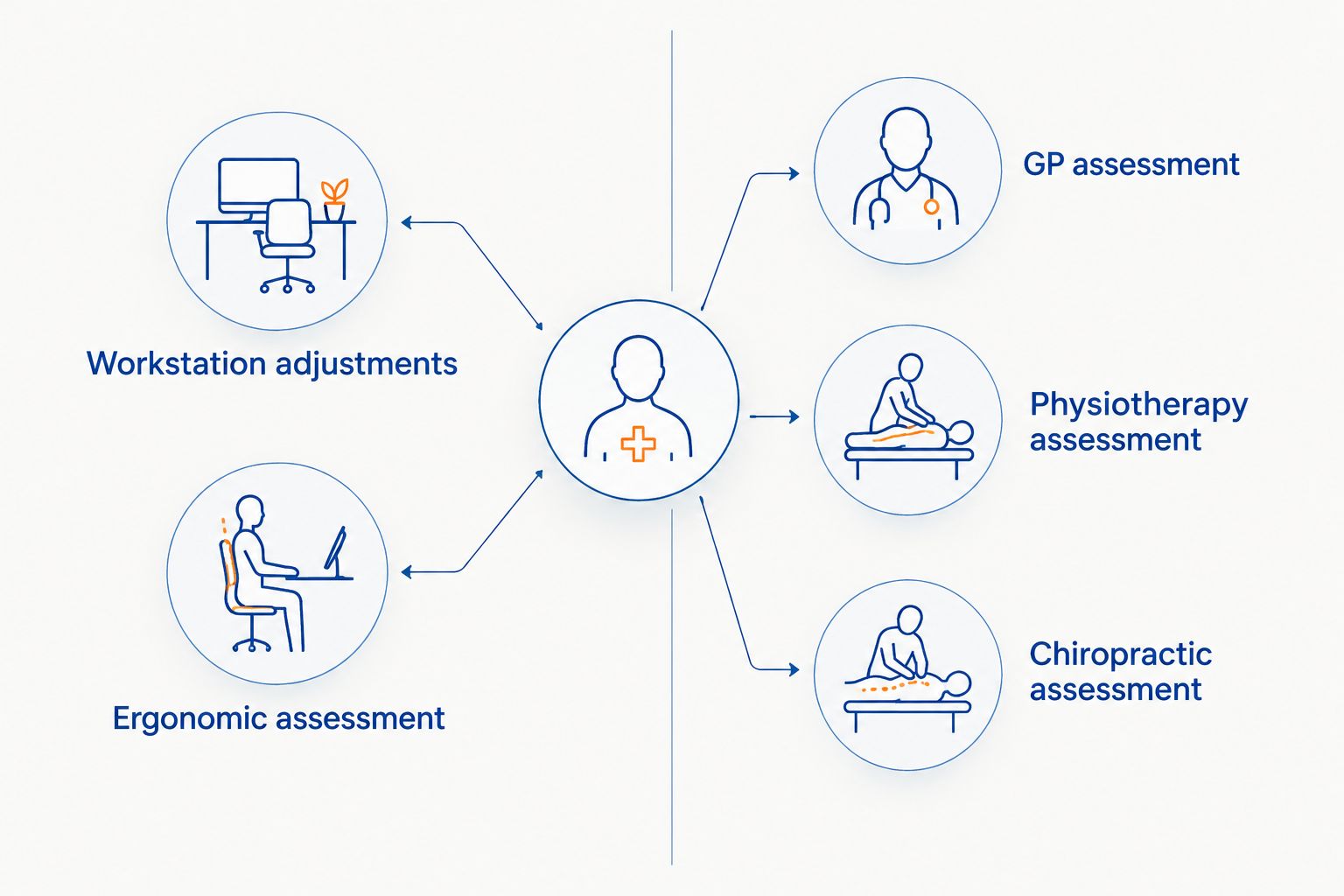
Match the option to the question you need answered. Workstation changes address the working environment; a clinical assessment considers your symptoms. Neither substitutes for the other.
| Option | Suited to | Useful contribution | Key limitation |
|---|---|---|---|
| Existing workstation adjustments | Reviewing screen visibility, reach and seating | Lets you test practical changes without replacing everything | Cannot diagnose symptoms or establish their cause |
| Workplace ergonomic assessment | Evaluating job tasks and equipment together | Considers the setup in the context of your actual work | Does not replace a clinical assessment |
| GP assessment | Unexplained symptoms, broader health concerns or referral needs | Provides medical assessment and coordination where appropriate | Does not automatically include a detailed workstation review |
| Physiotherapy assessment | Discussing movement, function and rehabilitation needs | Provides an assessment-led discussion within physiotherapy scope | Recommendations still depend on your presentation |
| Chiropractic assessment | Discussing musculoskeletal concerns and proposed chiropractic care | Provides an opportunity to assess suitability and discuss adjustments | Adjustments are not appropriate for every presentation; risks and alternatives need discussion |
A 2026 decision should consider the professional’s scope, your preferences and the assessment findings. Do not choose solely because a service describes itself as designed for programmers.
Common mistakes software developers make
Treating posture as a diagnosis
A video call screenshot cannot establish why you have pain. Describe your symptoms and tasks instead of concluding that a forward head position or rounded shoulders explains everything.
Buying hardware before checking the setup
A new chair, standing desk or split keyboard still needs to suit your workspace and tasks. Check positioning, adjustability and trial arrangements before replacing equipment.
Looking for an adjustment to offset unchanged work habits
Do not assume a procedure cancels out every demand of a long coding session. Discuss the working day, activity and relevant health context as well as any proposed hands-on care.
Following a colleague’s care schedule
Another developer’s appointments do not establish what you need. Ask for recommendations based on your own assessment, with a clear reason for ongoing care and a review point.
FAQ
Do software developers need regular chiropractic adjustments?
A software-development job does not establish a need for regular chiropractic adjustments. Recommendations should follow an individual assessment, with discussion of alternatives, risks and review criteria.
Can chiropractic care fix my coding posture?
Chiropractic care should not be presented as a guaranteed way to fix coding posture. Discuss your symptoms, workstation and functional concerns rather than assuming one posture explains the problem.
Should I see a GP or a chiropractor for desk-related pain?
A GP is an appropriate starting point for unexplained symptoms or broader medical concerns. A chiropractor can assess musculoskeletal concerns within their scope, with referral where indicated.
Is a standing desk enough to manage discomfort while coding?
A standing desk does not replace assessment of persistent or unexplained discomfort. It offers another working position, but the setup still needs to suit your tasks and allow position changes.
What should I bring to a chiropractic appointment?
Bring a description of your symptoms, relevant medical history, medicines and previous investigations if available. Include the work tasks and everyday activities that are difficult, and the questions you want answered.
Can I decline spinal manipulation?
You can decline a proposed procedure and ask about alternatives. Request an explanation of its purpose, risks and suitability before deciding whether to consent.
What symptoms need urgent medical attention rather than a routine appointment?
New bladder or bowel problems, loss of sensation around the groin or buttocks, or leg weakness or numbness require urgent medical assessment. Healthdirect Australia identifies these as warning signs in its back-pain guidance.
What does Mychiro offer software developers in 2026?
Mychiro offers chiropractic care and spinal adjustments in Bondi Junction. Whether a particular service is appropriate for a software developer depends on assessment; a job title alone does not establish suitability.
One last thing
Bring the workflow, not just a photograph of the chair. Explain which screen you use for code reviews, where meetings happen and whether you switch between home and office. That context gives a practitioner or workplace assessor more useful information than the equipment’s product name.
For your next 2026 workstation review, change one practical feature at a time and record what you notice. Keep those observations separate from diagnostic conclusions, and seek assessment when symptoms warrant it.
Related guides
- Lower back pain when sitting: causes and practical steps
- Chiropractic care for remote workers with makeshift home offices
- How to prepare for your first chiropractor appointment