

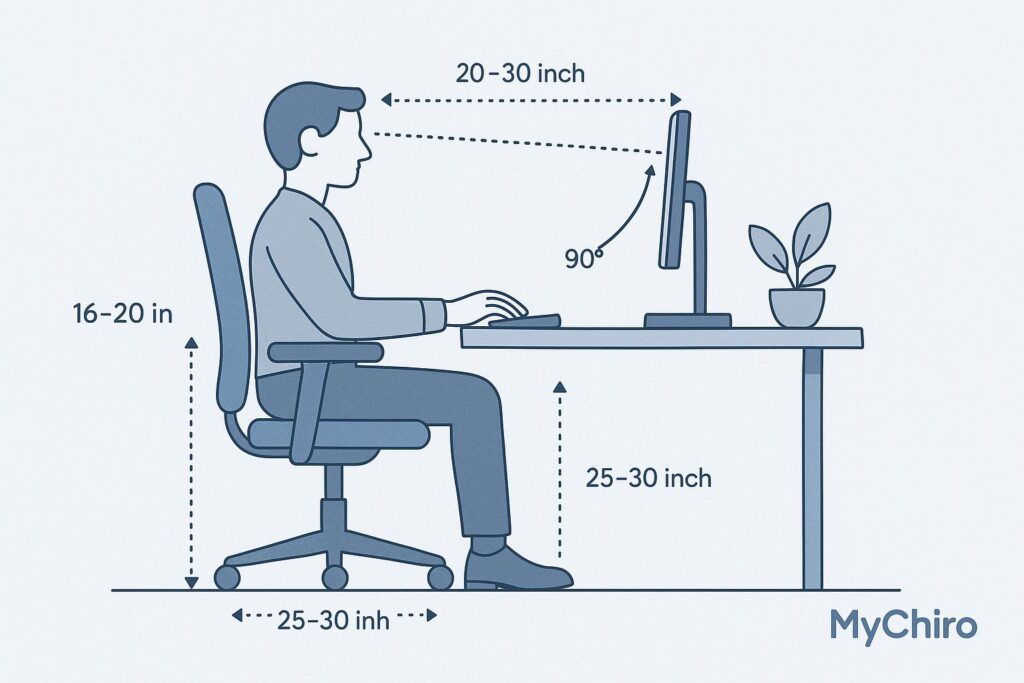
Optimise Your Workspace for Comfort and Health
Creating a workspace that supports your body is key to staying productive without the aches and pains. Many of us spend hours at a desk, often without realising how small misalignments in our setup can lead to discomfort. That’s where a tool like an ergonomic setup calculator comes in handy—it takes the guesswork out of finding the right heights for your chair, desk, and screen.
Why Posture Matters at Work
Poor posture from a suboptimal workstation can sneak up on you. A monitor that’s too low forces your neck to crane down, while a chair that’s off can mess with your lower back. Over time, these little issues add up, leaving you stiff or sore. By using a tool to assess your desk arrangement, you can make simple tweaks that keep your spine happy and your focus sharp.
Small Changes, Big Impact
Adjusting your setup doesn’t have to mean buying fancy gear. Sometimes, it’s as easy as sliding a box under your monitor or tweaking your seat height. With tailored advice from a workspace optimisation tool, you’ll know exactly what to do to feel better while you work. Take a minute to check your setup today—your body will thank you!
FAQs
Why is an ergonomic setup important for my health?
A proper ergonomic setup keeps your body aligned, reducing strain on your neck, back, and shoulders. If your monitor’s too low or your chair’s off, you’re likely hunching or overextending, which can lead to chronic pain over time. This tool helps you tweak your workspace to support natural posture, so you’re comfy even after long hours at the desk.
What if my desk or chair isn’t adjustable?
No worries! If your setup isn’t adjustable, our calculator will suggest practical workarounds. For instance, if your desk is too high, we might recommend a footrest to keep your knees at the right angle. Or, if your monitor needs a lift, a stack of books or a cheap stand can do the trick. We’ve got you covered with easy fixes.
How accurate are the recommendations from this tool?
Our recommendations are based on widely accepted ergonomic guidelines, like keeping your monitor at eye level and elbows at 90 degrees while typing. While everyone’s body is a bit different, these standards work well for most people. If you’ve got specific medical needs, though, it’s worth chatting with a professional to fine-tune things further.