

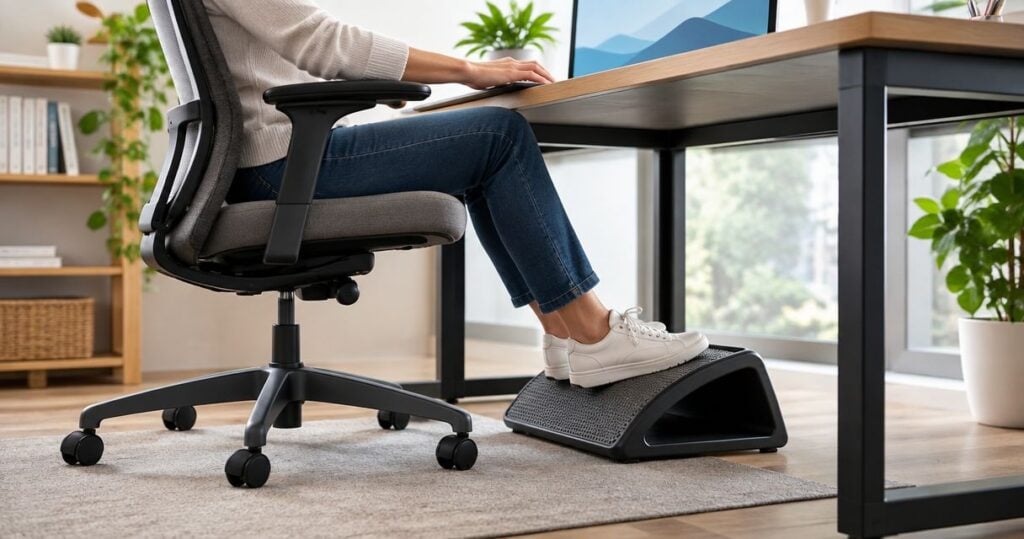
Default choice: a height-adjustable rigid footrest when your feet do not reach the floor after you position your chair for desk work. A rocking platform suits people who want optional foot movement, while a foam footrest suits those who prefer a cushioned surface; this 2026 guide compares designs by workstation fit, not promised posture or pain outcomes.
- The best footrest for posture at work depends on chair height, desk clearance and supported foot placement.
- Choose a height-adjustable rigid platform when you need to bridge the gap between your feet and the floor.
- Choose a rocking platform only if its movement feels comfortable and remains controllable.
- Mychiro’s footrest guide compares workstation features, not clinical outcomes.
Why this matters
A footrest is a workstation accessory, not a requirement for every desk. Its practical role is to provide a surface for your feet when the floor is out of reach at a chair height that suits your work surface.
Start with the mismatch you need to address. Buying a footrest because it carries an ergonomic label tells you little about whether it fits beneath your desk or supports your usual footwear.
Mychiro is a chiropractic clinic and wellness centre in Bondi Junction, Sydney. This guide covers general equipment selection; it does not recommend chiropractic care or present a footrest as a treatment for back pain, neck pain or a medical condition.
What makes a suitable under-desk footrest?
Use these criteria before comparing designs. For your 2026 shortlist, physical fit matters more than feature names.
- Height adjustment: The platform must reach your feet without forcing your knees into the underside of the desk. Check its adjustment range against your actual setup.
- Usable surface: Look at the area where your feet rest, not just the product’s overall dimensions. Raised edges and curved surfaces change the usable space.
- Stability: Check whether the base stays in place on your flooring and whether any adjustment mechanism holds its setting.
- Angle control: Distinguish a platform that locks at an angle from one that moves freely. These serve different preferences.
- Desk clearance: Allow room for your knees, chair base, cables and other equipment. A platform that fits on the floor can still obstruct your seated position.
- Everyday handling: Consider cleaning, footwear, moving between desks and whether adjustments require tools or lifting the whole unit.
Choose the footrest around the workstation, rather than changing your seated position to accommodate the footrest. If your feet already rest comfortably on the floor, another accessory is not automatically necessary.
Under-desk footrests at a glance
These are design categories, not named products. Features vary within each category, so confirm the specifications of any model you consider.
| Order | Footrest design | Suited to | Defining feature | Key limitation |
|---|---|---|---|---|
| 1 | Height-adjustable rigid platform | Bridging a changing chair-to-floor gap | A firm surface with adjustable height | Adjustment steps might not match your required position |
| 2 | Rocking platform | Optional foot movement while seated | A surface that pivots or rocks | Movement can be unwanted during concentrated tasks |
| 3 | Foam footrest | Preference for a cushioned foot surface | A compressible support | Its working height changes under pressure |
| 4 | Fixed-height platform | A known, consistent support height | A stationary surface without height adjustment | Limited scope to adapt to another chair or user |
1. Height-adjustable rigid platform: for a chair-to-floor gap
A height-adjustable rigid platform provides a firm resting surface at selectable heights. Some designs also offer angle adjustment, but that is a separate feature to confirm rather than assume.
This is the starting category when your chair needs to sit high enough for desk access and your feet no longer reach the floor. Look for settings you can change without a complicated sequence under the desk.
Height-adjustable rigid platform pros:
- Lets you change the support height when your chair setting changes.
- Provides a firm surface rather than one that compresses.
- Offers an option for desks used by people with different setup needs.
Height-adjustable rigid platform cons:
- Stepped adjustments can leave a gap between the positions you want.
- A large frame can reduce space around your chair base.
- More adjustment mechanisms mean more parts to check for secure positioning.
Fit: Workers whose feet need support after the chair is positioned for the work surface.
Check whether the height specification describes the front edge, rear edge or another part of the platform. An angled surface does not have the same height everywhere.
Verdict: Choose this category when adjustable height is the main requirement; hold off until you confirm desk clearance.
2. Rocking platform: for optional foot movement
A rocking footrest lets the supporting surface move rather than remain at a fixed angle. The movement comes from its pivot or curved base, depending on the design.
Consider it if you prefer changing your foot position while seated. Do not assume that rocking is necessary, or that a moving platform offers a clinical advantage over a stationary one.
Rocking platform pros:
- Allows changes in foot angle without resetting a fixed platform.
- Provides movement as a feature you can assess directly.
- Can suit users who dislike keeping their feet on a stationary surface.
Rocking platform cons:
- The platform can move when you want it to stay still.
- A freely moving surface does not provide a locked resting angle.
- The motion or mechanism can distract you or nearby colleagues.
Fit: Workers who specifically prefer a moving foot surface.
Check whether the platform returns to a resting position, stays where you place it or can lock. Those differences affect everyday use more than a general claim that the design is ergonomic.
Verdict: Choose a rocking platform for its movement preference, not as a substitute for checking workstation fit.
3. Foam footrest: for a cushioned surface
A foam footrest uses a compressible body instead of a rigid platform. Some have covers or shaped surfaces; check the individual model rather than treating these as standard features.
Its appeal is the feel beneath your feet. The important limitation is that the listed height and the height under your feet are not necessarily identical.
Foam footrest pros:
- Offers a cushioned alternative to a hard platform.
- Has no platform hinge when made as a single foam block.
- Provides a surface you can assess with your normal footwear.
Foam footrest cons:
- Compression changes the support height during use.
- A shaped top can limit where both feet comfortably fit.
- Cleaning depends on the covering and the manufacturer’s instructions.
Fit: Workers who prioritise cushioning and do not need a precisely held platform height.
Check whether a cover is removable and how the manufacturer says to clean it. Do not assume that washable, wipe-clean and removable mean the same thing.
Verdict: Choose foam for surface preference; skip it when a firm, repeatable height is your main requirement.
4. Fixed-height platform: for a known setup
A fixed-height platform provides a stationary surface without height adjustment. Its suitability depends on matching the platform to a workstation position you have already established.
This category is straightforward, but it leaves less room for correction after purchase. Changing chairs, footwear or desks can change how the platform fits.
Fixed-height platform pros:
- Does not require height settings during everyday use.
- Provides a consistent surface height when the structure is rigid.
- Avoids a height-adjustment mechanism you would otherwise need to check.
Fixed-height platform cons:
- Cannot adapt its height to a different user or chair setting.
- A fixed angle can be unsuitable for your preferred foot position.
- An incorrect height generally means choosing another support.
Fit: A single-user workstation with a confirmed support height.
Measure before choosing. A platform that appears low in a product photograph can still leave insufficient room beneath a shallow desk.
Verdict: Choose a fixed platform only after confirming the required height; wait if your workstation is still changing.
How the categories are ranked
The order prioritises adjustable fit, then distinct surface preferences, then fixed-fit simplicity. It is a feature-based decision guide, not a product test or a ranking of health benefits.
Mychiro’s footrest comparison does not score posture correction, symptom relief or injury prevention. For a 2026 purchase, use the category ranking to narrow your options, then verify the actual model’s dimensions and mechanism.
Set up the workstation before choosing the accessory
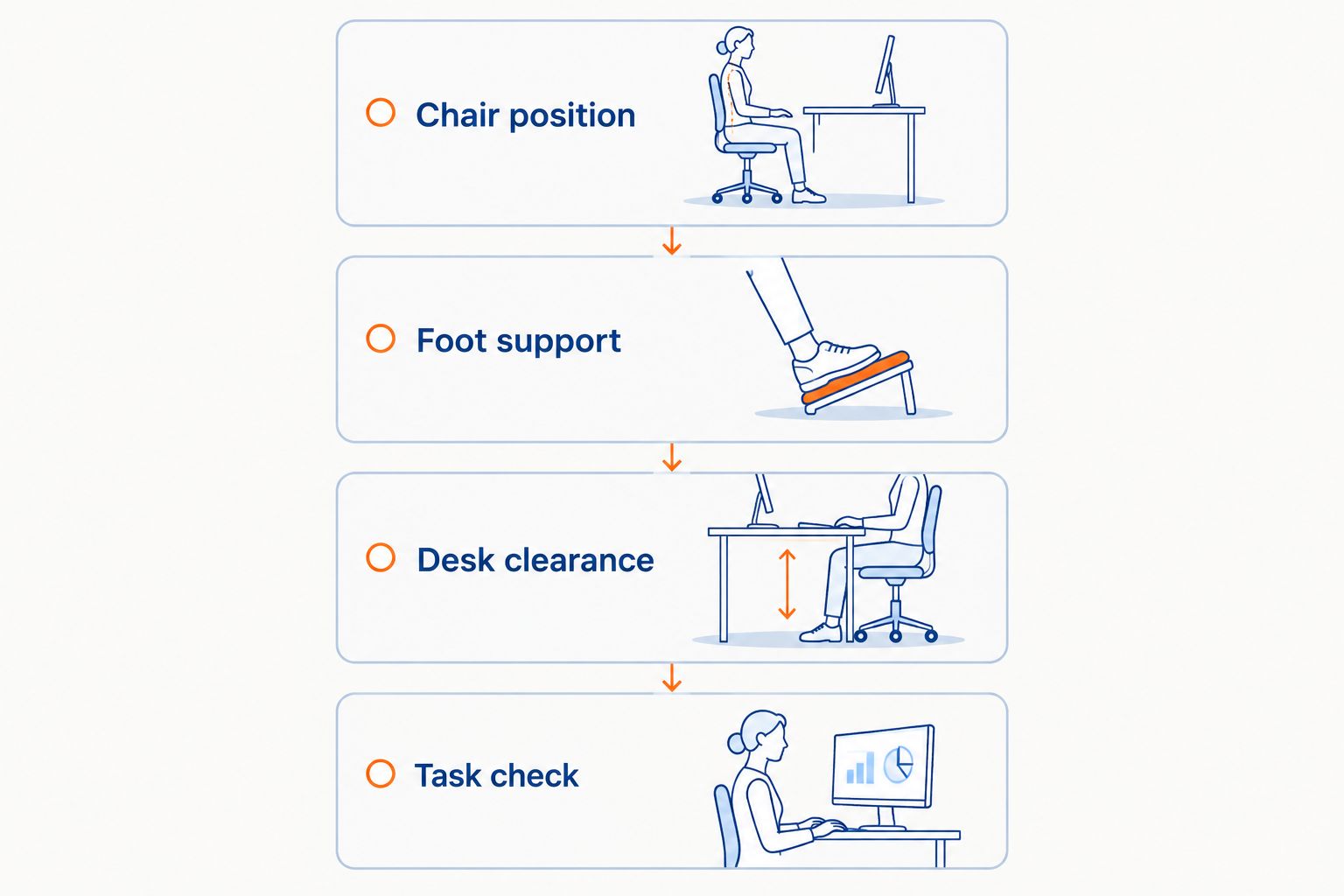
Work through these 4 checks in order. The aim is to identify whether a support is needed and where it must fit, rather than impose a single sitting position.
1. Chair position
Position your chair for the tasks you perform at the desk. Check whether you can reach the keyboard and mouse without having to stretch across the work surface.
Do not lower the chair solely to reach the floor if that leaves the desktop awkwardly high. Equally, do not raise it solely because a footrest is available.
2. Foot support
With the chair in that position, check where your feet naturally rest. If the floor already provides a comfortable resting surface, assess whether you need a footrest at all.
If a gap remains, note the support height you need while wearing your usual work footwear. Treat this as a measurement of your setup, not a universal prescription.
3. Desk clearance
Check the space above your knees and around your feet. Include desk drawers, support bars, computer equipment and the chair base in the assessment.
Test whether you can move the chair in and out without trapping the platform. A footrest should not become an obstacle whenever you stand up.
4. Task check
Try the setup during your normal activities, including typing, reading and reaching for frequently used items. Check whether the footrest stays where you place it.
Change a setting if it makes the arrangement awkward. You do not need to keep using an accessory simply because it was sold for posture.
Repeat these checks when you change your chair, desk or usual footwear. The accessory does not need to change every time, but its fit deserves another look.
What to check on a 2026 product listing
Use 3 measurements: the height of the supporting surface, its usable width and its usable depth. Compare them with your workstation rather than relying on photographs.
Next, distinguish confirmed specifications from advertising language. A listing that says posture support does not tell you whether the height locks, whether the base grips your floor or whether both feet fit on the surface.
Before selecting a model, check:
- Whether height and angle adjustment operate independently.
- Whether a rocking surface has a stationary setting.
- Whether the base suits your floor material.
- Whether the supplied dimensions include the frame or just the platform.
- Whether the cleaning instructions suit your workplace.
- Whether the manufacturer describes the intended seated use.
A missing specification is a reason to ask a question, not a reason to assume the feature exists. Avoid choosing a model based on an unsupported promise to realign your spine or remove nerve pressure.
Which footrest should you choose?
For an undecided reader, start with a height-adjustable rigid platform only if a support gap exists. That choice keeps the decision focused on a measurable workstation requirement.
Choose a rocking platform for optional movement, foam for cushioning, or a fixed platform for an already confirmed height. If no support gap exists, keeping the floor as your resting surface is a valid choice.
Mychiro is a Bondi Junction chiropractic clinic; a footrest is a workstation accessory, not a chiropractic service or a promised clinical outcome. Persistent discomfort can be discussed with a qualified health professional rather than managed by repeatedly buying desk accessories.
FAQ
What is the best footrest for posture at work?
Choose by workstation fit rather than a universal ranking. A height-adjustable rigid platform is a starting option when your feet do not reach the floor after you position your chair for desk work.
Do I need a footrest if my feet already reach the floor?
A footrest is not automatically necessary when the floor already provides a comfortable resting surface. Check your chair position and desk access before adding an accessory.
Is a rocking footrest preferable to a fixed footrest?
A rocking footrest suits a preference for movement; a fixed footrest suits a preference for a stationary surface. Neither design is presented here as offering a clinical advantage.
How high should my under-desk footrest be?
Its height should match the support gap in your own workstation. Measure with your chair positioned for desk work and check that the platform leaves room beneath the desk.
Should I choose foam or a rigid footrest?
Choose foam for a cushioned feel and a rigid platform when you need a firm support height. Foam compresses, so its listed height does not fully describe its height during use.
Can a footrest correct my posture or relieve back pain?
This guide does not establish that a footrest corrects posture or relieves back pain. It compares equipment features; persistent symptoms can be discussed with a qualified health professional.
What should I check before choosing a footrest in 2026?
Check support height, usable surface dimensions, stability, adjustment controls and desk clearance. Confirm the individual model’s specifications rather than relying on the word ergonomic.
One last thing
Check the underside of your desk before checking the footrest catalogue. A drawer or support bar can limit the space available even when the desktop looks roomy.
Your final check is ordinary use: sit down, work, move the chair and stand up. Keep the accessory only if it fits the workstation without creating another obstacle.
Related guides
- Ergonomic keyboards and mice: workstation considerations
- Lumbar support cushions for office chairs
- Ergonomic laptop stands: setup considerations