

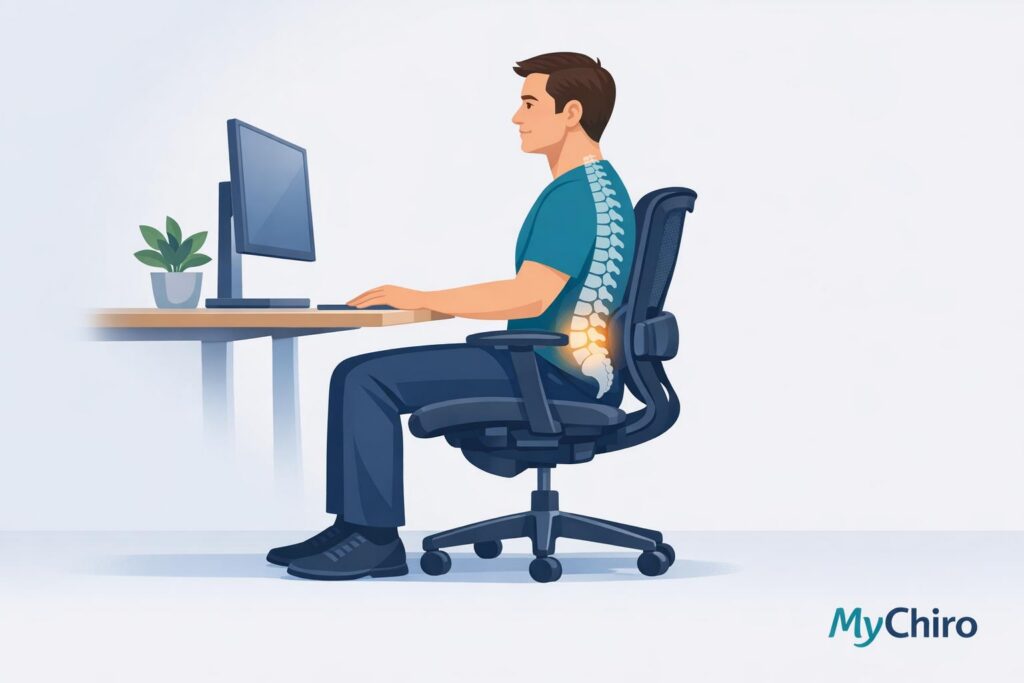
Sitting for long hours can strain your spine, increasing pressure by up to 40% compared to standing. Ergonomic chairs are designed to support your spine’s natural alignment, reducing discomfort and long-term issues. Key features like adjustable lumbar support, seat depth, and tilt mechanisms help maintain posture and ease muscle fatigue. Research shows that ergonomic seating can lower musculoskeletal pain and prevent back problems, as seen in studies where 95% of users reported no new back pain after six months.
In Australia, where 55% of serious workers’ compensation claims are linked to musculoskeletal disorders, ergonomic solutions are crucial, especially with 40% of Australians working from home. Pairing a well-designed chair with movement breaks and proper posture can significantly improve spinal health.
I Tested Chairs for Back Pain – Here’s the Truth
sbb-itb-585d67d
Chair Features That Support Spinal Health
Ergonomic chairs are designed to align with your spine’s natural curve, minimising strain during long periods of sitting. Knowing how these features work can guide you in selecting a chair that promotes better musculoskeletal health.
Lumbar Support and Lower Back Alignment
The lumbar region – the inward curve just above your hips – is particularly prone to discomfort during extended sitting. Without adequate support, this curve tends to flatten, increasing muscle tension and pressure on spinal discs.
Adjustable lumbar support plays a key role in preserving the natural curve of your lower back. Unlike fixed supports that assume a one-size-fits-all approach, adjustable options allow you to customise the support to match your spine’s unique shape, reducing strain and enhancing comfort.
"A good ergonomic chair keeps your spine in a neutral position. It holds your lower back where it naturally belongs rather than letting it slump forward or collapse inward." – Sihoo Australia
To maximise effectiveness, position the lumbar support so it gently aligns with your lower back’s natural curve. If placed too high, it may shift support away from your mid-back; too low, and it won’t provide the intended relief.
Seat Pan Tilt and Pelvic Position
Your pelvis serves as the foundation for spinal alignment. When it tilts backward (posterior pelvic tilt), the lower back flattens, often leading to slouching—a contrast to anterior pelvic tilt, where the pelvis tips forward. Seat pan tilt adjustments help maintain proper pelvic alignment by enabling you to alter the seat’s angle throughout the day.
Many ergonomic chairs feature synchro-tilt mechanisms, which synchronise the movement of the seat and backrest in a fixed ratio. This design ensures your spine remains neutral as you recline, without compromising foot placement or pelvic positioning. Fixed upright seating can increase spinal pressure, so having adjustable tilt options reduces long-term strain.
Seat depth adjustment is equally important. Ideally, there should be a 1–2 inch gap between the seat edge and the back of your knees. For those who are shorter or taller than average, this adjustment is critical. A seat that’s too deep may force you to sit forward, negating the benefits of lumbar support.
Pressure Distribution Across the Seat
Sitting in one position for too long can concentrate weight in specific areas, creating pressure points and discomfort. Ergonomic chairs are designed to evenly distribute body weight across the seat and backrest, reducing stress on any single area.
Features like tension control and recline mechanisms allow for position changes, which help relieve lumbar pressure and encourage small, beneficial movements. High-end chairs (typically $800+ AUD) often include advanced systems to optimise weight distribution during recline, while mid-range models ($400–$800 AUD) might offer dynamic lumbar support that adjusts with your movements, requiring less manual intervention.
Mesh backrests are particularly useful for prolonged sitting (8+ hours) as they prevent heat build-up, which can lead to restlessness and poor posture. While foam cushioning provides initial comfort, it may compress over time, losing its shape and leading to uneven pressure distribution.
These features not only improve comfort but also contribute to better posture and reduced strain over time, as supported by research on ergonomic design.
Research Findings on Ergonomic Chairs
Posture Support and Reduced Strain
A 2023 study from the University of Waterloo explored the impact of lumbar support on posture and discomfort during prolonged sitting. The results showed that 39% of participants reported significantly higher pain levels when ergonomic support was absent. Adjustable lumbar support was found to help maintain a neutral spine position, potentially reducing discomfort.
In 2024, the Scandinavian Journal of Work, Environment and Health published research on chairs featuring dynamic elements like split backrests and adjustable lumbar mechanisms. This study highlighted how promoting postural variation throughout the day reduced neck and lower back pain in high-risk office workers. These findings point to the benefits of movement-friendly chairs in minimising the strain caused by static sitting.
By improving spinal alignment, these chairs may help lower the risk of muscle strain and fatigue during extended periods of sitting.
Reduced Muscle Fatigue Over Time
Without proper lumbar support, back muscles are forced to work harder to keep the body upright, which can lead to fatigue and tightness. Ergonomic chairs are designed to support the spine in a neutral position, easing the strain on muscles, ligaments, and spinal discs.
Recline mechanisms with adjustable tension control allow users to shift positions periodically, redistributing pressure away from the lower back and reducing static muscle loading. A peer-reviewed paper, Positive Outcomes of Office Ergonomics, reported that ergonomic chair interventions not only reduced fatigue and discomfort but also improved workplace productivity.
These features not only lessen muscle fatigue but may also play a role in reducing pain over time.
Pain Reduction in Some Users
A systematic review in BMC Musculoskeletal Disorders examined how ergonomic chair interventions affect workers who sit for long periods. The review found evidence that these chairs can reduce the severity, intensity, and frequency of musculoskeletal pain for some individuals. However, responses to ergonomic adjustments vary, and their effectiveness depends on proper setup and use.
It’s worth noting that ergonomic chairs work best as part of a holistic approach to musculoskeletal health. This includes regular movement breaks, maintaining good posture, and seeking professional advice when necessary.
Comparing Chair Features and Their Effects
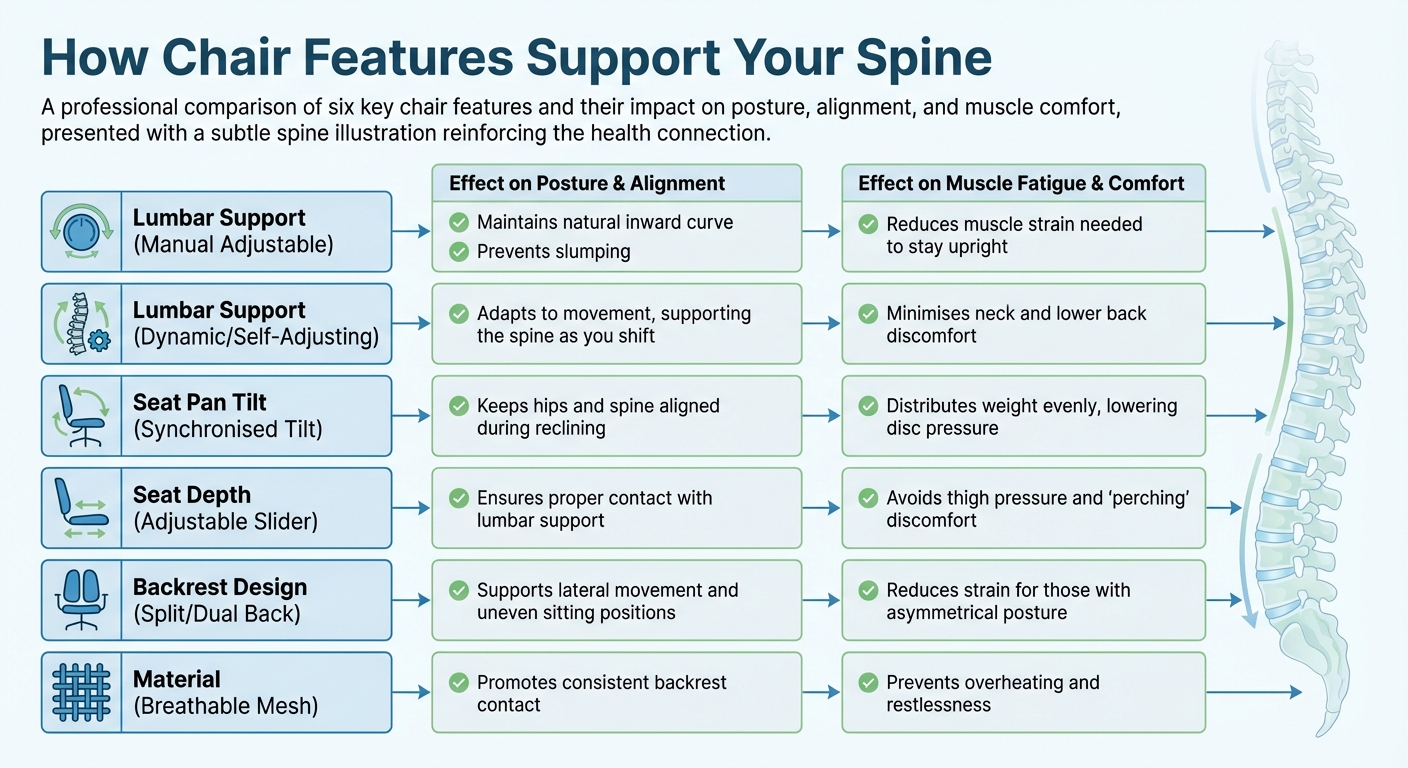
Ergonomic Chair Features and Their Impact on Spinal Health
Feature Comparison Table
Every chair feature plays a role in supporting spinal health. By understanding how these design elements work, you can make better decisions when choosing or adjusting your chair.
| Feature | Design Type | Effect on Posture & Spinal Alignment | Effect on Muscle Fatigue & Comfort |
|---|---|---|---|
| Lumbar Support | Manual Adjustable | Maintains natural inward curve; prevents slumping. | Reduces muscle strain needed to stay upright. |
| Lumbar Support | Dynamic/Self-Adjusting | Adapts to movement, supporting the spine as you shift. | Minimises neck and lower back discomfort. |
| Seat Pan Tilt | Synchronised Tilt | Keeps hips and spine aligned during reclining. | Distributes weight evenly, lowering disc pressure. |
| Seat Depth | Adjustable Slider | Ensures proper contact with lumbar support. | Avoids thigh pressure and "perching" discomfort. |
| Backrest Design | Split/Dual Back | Supports lateral movement and uneven sitting positions. | Reduces strain for those with asymmetrical posture. |
| Material | Breathable Mesh | Promotes consistent backrest contact. | Prevents overheating and restlessness. |
This table highlights how individual features impact both spinal alignment and overall comfort.
Manual lumbar supports require users to set a fixed position, whereas dynamic supports automatically adapt to your movements. This adaptability is particularly helpful for those who frequently change tasks or seating positions throughout the day.
Breathable mesh backrests help prevent heat build-up, which can lead to discomfort, while foam backrests provide cushioning but may lose their shape over time.
Ultimately, the effectiveness of each feature depends on how it integrates with other chair elements. For example, a chair with adjustable seat depth and lumbar support works better for spinal alignment than one lacking these features. However, chair design alone isn’t enough – regular movement, posture awareness, and, in some cases, care focused on the nervous system are also essential for maintaining spinal health.
Supporting Spinal Health Beyond Your Chair
Even the most ergonomic chair can’t completely counteract the effects of prolonged sitting. Australians spend more than 70% of their workday seated, often slouching after just 20 minutes. The real key to spinal health isn’t just about sitting better – it’s about sitting less and incorporating more movement into your day.
Movement Breaks and Posture Awareness
While chair design plays a role, regular movement is crucial for spinal health. The 20-8-2 rule provides a simple way to break up long periods of sitting: sit for 20 minutes, stand for 8 minutes, and move or stretch for 2 minutes. This routine can help counteract the 30% to 40% increase in lumbar disc pressure that occurs during sitting compared to standing. Setting reminders can keep you on track, especially when you’re engrossed in work.
Adding micro-movements every 30 minutes can also make a difference. These include weight shifts, slight reclines, or gentle neck stretches to ease pressure and prevent stiffness. Simple exercises like shoulder rolls and standing backbends can alleviate tension in the upper back and chest, while hamstring stretches improve circulation in the legs.
Positioning matters too. Keep your monitor at eye level to avoid forward head posture and reduce neck strain. Your keyboard should allow your forearms to stay parallel to the floor, and your feet should rest flat on the ground, with your knees bent at a 90° to 110° angle. As Dr Jahnavi Acharya, Consultant Physiotherapist, explains:
"Even after using an ergonomic chair if you keep your back slouched, you will suffer all the kinds of problems."
How Chiropractic Care Can Help
Even with good posture and regular movement, tension can still build up over time. When ergonomic adjustments and movement aren’t enough, chiropractic care may help. By addressing spinal alignment and reducing persistent muscle tension, chiropractic treatments can complement your efforts to maintain spinal health.
Dr Steve in Bondi Junction specialises in evidence-based chiropractic care, focusing on posture and musculoskeletal health. His gentle, nervous-system-centred approach may help support your spine’s natural alignment and ease strain caused by long hours at a desk. With flexible scheduling and online booking, fitting chiropractic care into your routine is simple.
Combining ergonomic seating, regular movement, and occasional chiropractic care offers a well-rounded way to manage spinal strain and maintain long-term spinal health.
Conclusion
The combined advantages of ergonomic seating and regular movement contribute to better spinal health. Ergonomic chairs play a key role by supporting the natural curve of your lower back and easing strain on muscles and discs. But let’s be clear – no single solution works in isolation. As Sihoo Australia aptly states:
"A chair alone will not cure back pain, but it can significantly reduce the strain that causes it in the first place."
The real game-changer is pairing proper seating with consistent movement and posture awareness. Simple habits like following the 20-8-2 rule, setting up your workstation correctly, and taking frequent micro-breaks can make a big difference. Even the best chair won’t help if you remain in a static posture for hours on end.
If discomfort persists despite these efforts, it may signal the need for professional care. Chiropractic treatment, for instance, can address deeper alignment issues or muscle tension that ergonomic furniture alone might not resolve.
Considering the prevalence of back issues in Australia – around 4 million Australians reported back problems in 2022, and musculoskeletal disorders accounted for 55% of serious workers’ compensation claims – taking proactive measures is essential. By combining supportive seating, regular movement, and professional care when necessary, you can create a balanced strategy to maintain spinal health for the long haul.
This content is for informational purposes only and is not a substitute for professional medical advice. Results from chiropractic care may vary. Always consult a qualified healthcare provider for personalised guidance.
FAQs
How do I set lumbar support correctly for my back?
To adjust lumbar support properly, align it with the natural curve of your lower spine. One simple trick is to check if you can fit three fingers between your lower back and the support. Alternatively, adjust it until your lower back feels comfortably supported by the seat. The aim is to close the gap in your lower back, ensuring comfort and healthy spinal alignment.
What seat depth is suitable for my height and leg length?
A good seat depth should allow for about 5–10 cm (2–4 inches) of space between the front edge of the seat and the back of your knees. This gap helps promote proper circulation and enhances comfort. That said, the exact measurement might differ depending on your body proportions and personal preferences.
How often should I stand up if I sit all day?
To help maintain spinal health and minimise discomfort, it’s a good idea to stand up, move around, or shift your position every 30 to 60 minutes if you’re sitting for extended periods. Regular movement can relieve pressure and encourage better posture throughout the day.


