


Start with an adjustable task chair for a conventional study desk; consider a shallow-seat chair for a smaller frame or a compact chair for limited space. This 2026 guide to the best ergonomic chair for students compares furniture features and fit—not claims that a chair will relieve back pain.
- The best ergonomic chair for students depends on seat fit, desk clearance and usable adjustments.
- An adjustable task chair is the starting option for a conventional study desk.
- Smaller students should check seat depth before comparing upholstery or accessories.
- Mychiro’s ergonomic chair guide separates furniture selection from assessment of back pain.
Why this matters
An ergonomic label does not tell you whether a chair fits your legs, reaches your desk or lets you use the backrest while typing. Those are the details you need to check before choosing.
Choose furniture for the tasks you do, not for a promised clinical result. Back pain alone does not identify which chair you need, and a shopping guide cannot establish its cause.
Mychiro is a chiropractic clinic and wellness centre in Bondi Junction, Sydney. This article provides general furniture-selection information for adult students; it does not recommend chiropractic care or a chair as a treatment for pain.
What makes a useful ergonomic student chair?
Use these criteria for your 2026 shortlist before comparing appearance or extra features:
- Seat height: You should be able to reach the work surface with relaxed shoulders while keeping your feet supported.
- Seat depth: You should be able to use the backrest without the seat edge pressing behind your knees.
- Backrest fit: Check where the support meets your back. A prominent lumbar shape is not automatically a suitable shape.
- Desk clearance: Armrests and the chair base must let you get close enough to your keyboard and books.
- Usable controls: Adjustments should be reachable and understandable while you are seated.
- Task flexibility: Check the chair while typing, handwriting and reading—not just while sitting back in a showroom.
Treat these as pass-or-fail checks rather than a feature-counting contest. A chair with fewer controls that fits your desk is a more relevant candidate than one whose adjustments never reach the position you need.
Student chairs at a glance
These 5 chair types represent different buying situations, not tested product rankings. Individual models within each category differ, so check the actual chair rather than relying on its category name.
| Chair type | Suitable for | Feature to check | Key limitation |
|---|---|---|---|
| Adjustable task chair | A conventional study desk | Height, backrest and seat adjustments | Adjustment ranges might not match your body |
| Shallow-seat task chair | Smaller frames | Usable seat depth | A short seat can be unsuitable for longer thighs |
| Compact task chair | Restricted desk space | Base footprint and arm clearance | Compact dimensions can limit seat space |
| Adjustable mesh-back chair | Students who prefer an open backrest | Mesh tension and backrest shape | Mesh feel varies between models |
| Adjustable upholstered chair | Students who prefer a padded backrest | Padding, seat shape and controls | Padding can disguise an unsuitable seat shape |
1. Adjustable task chair: for a conventional study desk
An adjustable task chair is the first category to examine when you use a standard desk for typing, reading and handwritten work. Look for independently usable seat-height and backrest controls; check seat-depth adjustment if the model includes it.
The word adjustable needs inspection. A control can exist without moving far enough for your body or without remaining accessible once the chair is under your desk.
Adjustable task chair advantages:
- Seat-height adjustment lets you compare different working positions.
- Backrest controls let you check more than a single fixed angle.
- Models with adjustable armrests offer another way to check desk clearance.
Adjustable task chair limitations:
- A deep seat can remain unsuitable even at its shortest setting.
- Several controls can make initial setup confusing.
- Armrests can obstruct a desk despite fitting comfortably away from it.
Suitable for: Adult students using one desk for several study tasks.
Verdict: Consider an adjustable task chair first, but skip any model that fails your seat-depth or desk-clearance checks.
2. Shallow-seat task chair: for smaller frames
A shallow-seat task chair has less usable distance between the backrest and the front edge of the seat. This category deserves attention if you cannot sit against a conventional backrest without the seat reaching the backs of your knees.
Check usable depth while seated, not just the external dimensions in a listing. A thick backrest or attached cushion changes the space you actually occupy.
Shallow-seat task chair advantages:
- A shorter seat gives smaller users a different fit option.
- A suitable depth lets you assess the backrest without perching forward.
- Models with adjustable depth offer flexibility between users.
Shallow-seat task chair limitations:
- A short seat might not suit someone with longer thighs.
- A smaller seat does not guarantee a sufficiently low height setting.
- Fixed armrests can still sit too wide or too high.
Suitable for: Adult students whose legs do not comfortably fit a deeper seat.
Verdict: Consider a shallow-seat chair when depth is the failed fit check; do not choose it solely because you are shorter than average.
3. Compact task chair: for restricted desk space
A compact task chair prioritises its overall footprint. Check the width of the base, the distance between armrests and the space needed to pull the chair away from your desk.
This is a room-layout choice as much as a seating choice. A narrow chair still needs enough room for you to sit down, move and leave the desk without manoeuvring around furniture.
Compact task chair advantages:
- A smaller footprint gives you another option for a narrow study area.
- Armless designs remove one possible source of desk interference.
- Compact models can be easier to position between nearby furniture.
Compact task chair limitations:
- A narrow seat might not provide enough sitting space for you.
- Short armrests or absent armrests change how you arrange your workspace.
- Compact dimensions do not establish whether the chair fits your body.
Suitable for: Adult students with limited floor space or a narrow desk opening.
Verdict: Consider a compact chair only after checking both your body fit and the space around the desk.
4. Adjustable mesh-back chair: for an open-backrest preference
A mesh-back chair uses tensioned fabric rather than a fully padded backrest. Assess the actual mesh surface, the surrounding frame and any separate lumbar component.
Do not assume that mesh means adjustable. Some models have a fixed backrest shape, and the frame can determine where you feel contact more than the fabric itself.
Adjustable mesh-back chair advantages:
- The open material offers an alternative to a padded backrest.
- The backrest shape is usually easy to inspect visually.
- Models with separate lumbar controls let you compare support positions.
Adjustable mesh-back chair limitations:
- Firmness and tension vary between models.
- A rigid frame might contact your back or shoulders uncomfortably.
- A fixed lumbar shape cannot be repositioned to suit every user.
Suitable for: Adult students who prefer the feel of mesh after trying it.
Verdict: Consider mesh for material preference, not as evidence of a clinical benefit or a suitable fit.
5. Adjustable upholstered chair: for a padded-backrest preference
An upholstered chair uses a covered, padded seat or backrest. It is an alternative for students who dislike the feel of tensioned mesh or exposed backrest frames.
Separate the first impression of softness from working fit. Sit at a desk and check whether you can reach your materials without sliding away from the backrest.
Adjustable upholstered chair advantages:
- Padding offers a different contact surface from mesh.
- A continuous backrest avoids the exposed frame found on some mesh designs.
- Adjustable models let you assess padding alongside different backrest positions.
Adjustable upholstered chair limitations:
- Thick padding can make usable seat dimensions harder to judge.
- Softness does not establish whether a chair suits your study tasks.
- Upholstery care requirements differ, so inspect the manufacturer’s instructions.
Suitable for: Adult students who prefer a padded surface and can verify the underlying fit.
Verdict: Consider upholstery after checking seat dimensions and controls; skip a chair whose softness is its only convincing feature.
Check the chair at your actual desk
For your 2026 chair comparison, record 2 measurements before shopping: the height of your work surface and the clear width beneath it. Bring those measurements when inspecting a chair, then check the complete setup wherever possible.
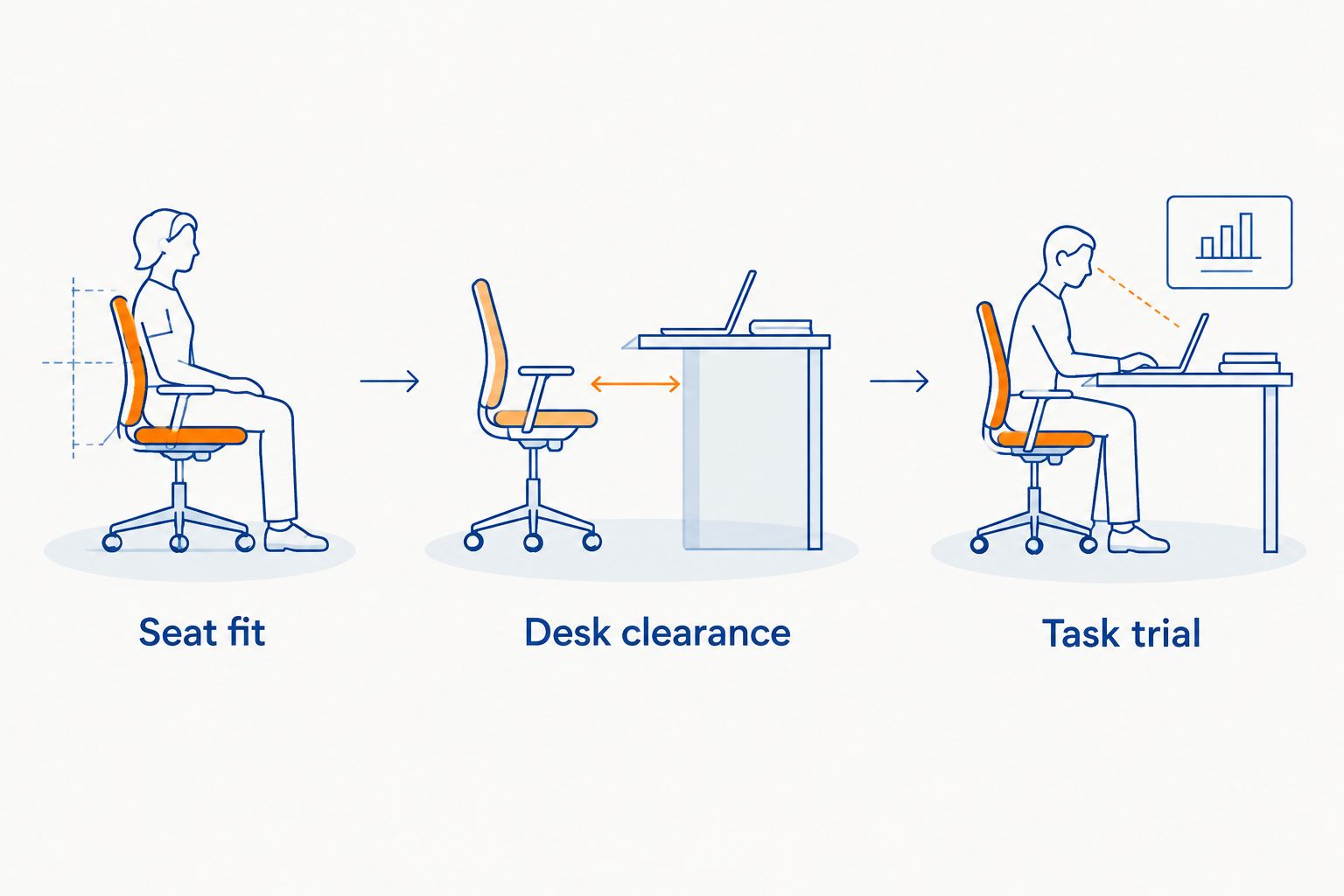
Seat fit
Sit back and place your feet on the floor or an appropriate foot support. Check that the seat edge does not press behind your knees and that you can use the backrest without stretching forward to work.
Do not force yourself into a rigid pose to make the chair appear suitable. The point is to find usable adjustment positions, not to hold one position throughout a study session.
Desk clearance
Move towards the desk with the armrests in a workable position. Check that the armrests do not stop you reaching the keyboard or push your shoulders upwards.
Australian workstation guidance commonly uses elbows around 90 degrees as an initial setup reference. Treat that as a starting point rather than an exact angle you must maintain; your desk, task and individual needs also matter.
Task trial
Try typing, handwriting and reading. Notice whether each task requires you to perch on the front edge, reach across the desk or move your materials out of a usable position.
A laptop adds another decision because its screen and keyboard are connected. If you raise the screen, consider how you will use a separate keyboard and mouse; the chair cannot independently change those relationships.
How the chair categories are ordered
This 2026 guide starts with a general-purpose adjustable task chair, then separates options by the constraint each addresses: shorter seat depth, limited space, mesh preference or padding preference. The order reflects a selection process, not comparative clinical performance.
Mychiro does not sell a named chair in this guide, and no chair is presented as a treatment recommendation. The comparison concerns observable furniture features: dimensions, controls, clearance and materials.
For workstation references, consult Safe Work Australia’s computer-workstation guidance and Comcare’s office-workstation guidance. Those sources address workstation setup; they do not establish that a particular chair will resolve an individual student’s pain.
Which student chair should you choose?
Choose an adjustable task chair that passes your fit checks unless a specific constraint points elsewhere. Move to a shallow-seat option for depth, a compact option for space, or mesh and upholstery options according to your material preference.
Before choosing in 2026, write down your failed checks rather than a wish list of accessories. That keeps the decision specific: a headrest does not answer a seat-depth problem, and extra padding does not answer an armrest-clearance problem.
If your current chair passes the checks, changing the chair is not automatically the next step. Review the arrangement of your desk and materials, and seek individual advice for ongoing symptoms rather than repeatedly replacing furniture.
When back pain needs a separate conversation
Do not use a chair purchase as a substitute for medical assessment. If back pain persists, worsens or limits your usual activities, discuss it with a qualified health professional.
Healthdirect Australia’s back-pain guidance identifies symptoms that need urgent medical attention, including new bladder or bowel problems or numbness around the groin. Seek urgent medical care for those symptoms rather than adjusting your workstation or waiting for a furniture change.
This guide is intended for adults. For a child or teenager with back pain, seek age-appropriate medical advice rather than applying an adult furniture guide as a management plan.
FAQ
What should I look for in an ergonomic chair for university study?
Check seat height, usable seat depth, backrest fit and clearance beneath your desk. Try typing, handwriting and reading before deciding whether the chair suits your tasks.
Can an ergonomic chair resolve my back pain?
A chair-selection guide cannot establish that a chair will resolve your back pain. Choose furniture for fit and discuss persistent, worsening or activity-limiting symptoms with a qualified health professional.
Is mesh better than a padded student chair?
Neither material establishes a suitable fit by itself. Compare the actual backrest shape, frame contact, adjustments and your preference for the surface.
What chair should a shorter adult student consider?
Consider a chair with a suitably shallow seat and a low enough height setting. Check both features while seated because a smaller-looking chair can still be too deep or too high.
Do I need armrests on a study chair?
Armrests are optional, and their usefulness depends on your desk and tasks. If fitted, check that they do not stop you approaching the desk or push your shoulders upwards.
Should I replace my chair before changing my desk setup?
Check the complete workstation before replacing the chair. A chair change does not independently alter a fixed desk height or the relationship between a laptop screen and its keyboard.
Does Mychiro recommend a particular chair brand?
This Mychiro ergonomic chair guide does not recommend a named manufacturer or model. It compares chair categories using observable fit and adjustment features rather than clinical-outcome claims.
One last thing
Photograph the chair’s control positions after you find a usable setup. If someone else uses the chair, you then have a reference for restoring your adjustments instead of starting again from memory.
A useful chair is one you can set up for your desk and tasks. Keep that practical test ahead of labels, appearance and promises about your back.
Related guides
- Ergonomic laptop stands: features to compare
- Under-desk footrests: features to compare
- Ergonomic keyboards and mice: features to compare