

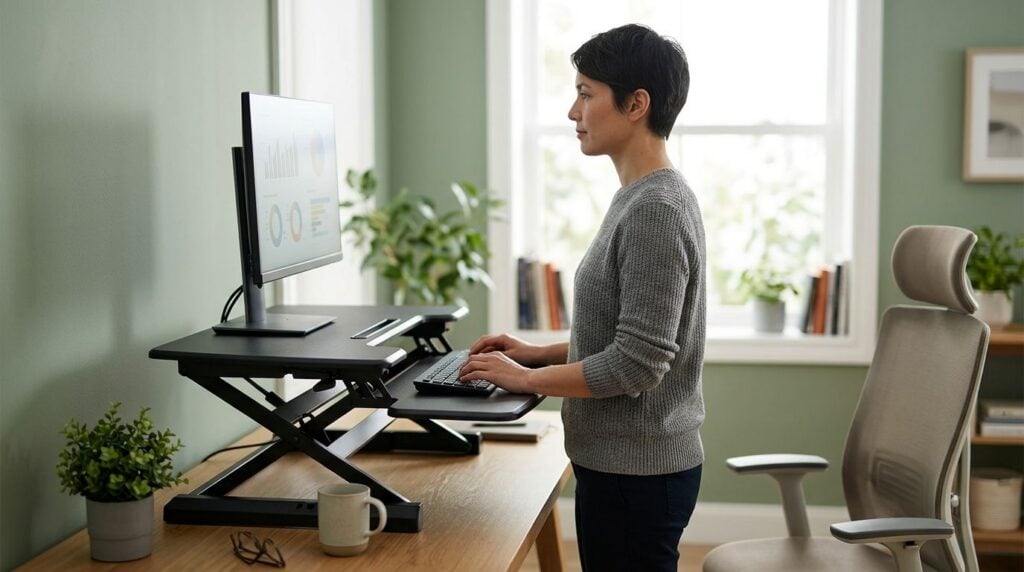
Standing desk converters turn a fixed desk into a sit-stand setup without buying new furniture, and the right one can support better posture habits through a long workday. This guide ranks five widely available converters for 2026 by stability, keyboard tray design and desk fit, not by hype.
Best overall: the Ergotron WorkFit-T. Best for tight budgets: the FlexiSpot M2B. Best for hot-desk offices: the VariDesk Pro Plus 36. Best for multi-monitor setups: the Uplift Standing Desk Converter. Best entry-level pick: the VIVO Height-Adjustable Standing Desk Converter.
- The Ergotron WorkFit-T is the most practical best standing desk converter for back pain for most home offices in 2026.
- The FlexiSpot M2B suits buyers who want a dual-tier keyboard tray on a tighter budget.
- No desk converter fixes or cures back pain on its own — posture variety is one factor among several.
- Stability, keyboard tray depth and monitor height range matter more than brand name when comparing converters.
- Persistent back pain is worth discussing with a health professional following assessment, regardless of desk setup.
Why this matters
Sitting still for hours at a fixed-height desk is a common complaint raised by patients dealing with lower back and neck discomfort. A standing desk converter doesn't replace an assessment with a chiropractor in Bondi Junction, but it can give you a practical way to vary posture during the day.
The research on standing desks is mixed — alternating between sitting and standing throughout the day is generally recommended over standing continuously, and desk converters are one of the more affordable ways to do that in 2026. If your job involves long stretches at a screen, pairing a converter with the ergonomic setups for shift workers approach covers more of the picture than the desk alone.
What makes the best standing desk converter
- Stability at full standing height — no wobble or bounce when typing with the platform raised
- Keyboard tray depth and negative tilt — enough room for a mouse and a wrist angle that doesn't force extension
- Independent monitor height adjustment — screen and keyboard should move on separate planes
- Lift mechanism — gas-spring, manual crank or electric, each with a different learning curve
- Desktop footprint — how much of your existing desk the unit occupies when lowered
- Weight capacity — whether it comfortably holds a monitor arm, laptop dock or dual-monitor setup
At a glance
| Converter | Best for | Standout feature | Key limitation |
|---|---|---|---|
| Ergotron WorkFit-T | Dual-monitor setups | Wide single-surface riser with gas-spring lift | Larger footprint when raised |
| FlexiSpot M2B | Tight budgets | Dual-tier design with a separate keyboard tray | Narrower work surface than full-desk risers |
| VariDesk Pro Plus 36 | Hot-desk offices | Spring-assisted lift with no assembly required | Bulkier to store when not in use |
| Uplift Standing Desk Converter | Heavy monitor arms | Sturdier frame built for multi-monitor loads | Higher price bracket within the category |
| VIVO Height-Adjustable Converter | Entry-level buyers | Simple single-tier riser, minimal setup | Fewer height increments than premium models |
1. Ergotron WorkFit-T: best standing desk converter for dual-monitor setups
The WorkFit-T is a single-surface riser that lifts an entire work area — laptop, keyboard and up to two monitors — on a gas-spring mechanism. It's one of the more established names in this category and sits flat on the desk when lowered.
Ergotron WorkFit-T pros:
- Wide surface handles dual monitors without a separate arm
- Gas-spring lift needs no crank or motor
- Minimal desk assembly required out of the box
Ergotron WorkFit-T cons:
- Takes up more desk depth than dual-tier units
- No independent keyboard tray tilt
Best for: anyone running two monitors on a standard desk. Verdict: Buy.
2. FlexiSpot M2B: best standing desk converter for tight budgets
The M2B uses a dual-tier layout, with the keyboard tray sitting below the monitor platform on a separate arm. That split lets you set screen height and typing height independently, which single-tier risers can't do.
FlexiSpot M2B pros:
- Separate keyboard tray with negative tilt option
- Lower cost than most dual-tier competitors
- Compact footprint when lowered
FlexiSpot M2B cons:
- Work surface is narrower than the WorkFit-T
- Some buyers report the keyboard tray flexes slightly under a heavy mechanical keyboard
Best for: shared or home offices where budget matters more than desk width. Verdict: Buy.
3. VariDesk Pro Plus 36: best standing desk converter for hot-desk offices
The Pro Plus 36 arrives pre-assembled and uses a spring-assisted lift with a single-handle release, which suits offices where several people share the same desk across a shift. No tools, no setup time.
VariDesk Pro Plus 36 pros:
- Ready to use straight out of the box
- One-handle height adjustment suits fast shift changes
- Wide surface accommodates a laptop and external monitor
VariDesk Pro Plus 36 cons:
- Bulkier profile than converters designed to fold flatter
- Heavier unit, which makes moving it between desks less convenient
Best for: hot-desk offices and shared workstations. Verdict: Buy.
4. Uplift Standing Desk Converter: best standing desk converter for multi-monitor arms
Built with a heavier-duty frame than most converters in this list, the Uplift model is aimed at setups running a monitor arm plus laptop dock rather than a single screen resting directly on the platform.
Uplift Standing Desk Converter pros:
- Sturdier frame suits monitor arms and docking stations
- Smooth height transition across the full range
- Stable at maximum height with added hardware attached
Uplift Standing Desk Converter cons:
- Priced above most converters on this list
- Overkill for a single-screen, laptop-only setup
Best for: desks running a monitor arm or multiple peripherals. Verdict: Buy.
5. VIVO Height-Adjustable Standing Desk Converter: best standing desk converter for entry-level buyers
The VIVO unit is a straightforward single-tier riser with a manageable number of height positions. It's the simplest option here and the easiest to learn on if you've never used a converter before.
VIVO Converter pros:
- Simple single-tier design with minimal learning curve
- Lightweight enough to move between rooms
- Lower cost than the dual-tier options above
VIVO Converter cons:
- Fewer height increments than premium models
- Keyboard and monitor share one fixed platform
Best for: first-time buyers testing whether a standing desk converter suits their routine. Verdict: Hold — try it before committing to a pricier unit.
How we ranked these
Each converter is measured against the same six criteria: stability at full height, keyboard tray depth, monitor adjustability, lift mechanism, desktop footprint and weight capacity. Ties were broken by how quickly each unit moves between sitting and standing height, since that's the feature people actually use daily.
“If you need to lean on the desk to reach standing height, the converter is set too low for your posture.”
Discuss your desk setup with a chiropractor
An assessment can identify whether posture or workstation habits are contributing to your back pain.
Which standing desk converter should you choose?
For most home offices in 2026, the Ergotron WorkFit-T is the most practical default — wide enough for two monitors, simple gas-spring lift, minimal setup. If budget is the deciding factor, the FlexiSpot M2B gets you a dual-tier layout for less. Shared offices should look at the VariDesk Pro Plus 36 for speed between users, and anyone running a monitor arm or dock is better served by the Uplift Standing Desk Converter.
A desk converter changes how you sit and stand through the day. It doesn't diagnose why your back hurts in the first place — that's a conversation for an assessment, not a product spec sheet.
FAQ
What is the best standing desk converter for back pain in 2026?
The Ergotron WorkFit-T is the most practical option for most desks in 2026 because it fits dual monitors on a stable gas-spring lift. It works best alongside regular posture breaks rather than as a standalone fix.
Can a standing desk converter fix back pain?
No — a standing desk converter does not fix or cure back pain on its own. It can support posture variety during the day, but ongoing back pain is worth discussing with a health professional following assessment.
Is a standing desk converter better than a full standing desk?
A converter sits on top of your existing desk and costs less than replacing the whole desk, but it usually offers a smaller work surface and fewer height increments than a dedicated standing desk.
Do standing desk converters work on small desks?
Dual-tier converters like the FlexiSpot M2B and single-tier units like the VIVO converter generally have a smaller footprint than wide risers such as the Ergotron WorkFit-T, making them easier to fit on compact desks.
How often should I switch between sitting and standing?
General ergonomic guidance suggests alternating position every 30 to 60 minutes rather than standing continuously for hours. A converter only helps if you actually use the height range through the day.
Can a standing desk converter help with neck pain too?
An independently adjustable monitor height can reduce forward head posture at a screen, but neck pain has several possible causes. A converter addresses screen height, not the underlying cause of ongoing symptoms.
What’s the difference between single-tier and dual-tier converters?
Single-tier converters like the VIVO model raise the keyboard and monitor together on one platform. Dual-tier converters like the FlexiSpot M2B separate the two, letting you set screen height and typing height independently.
Do I need an electric converter or is manual lift enough?
Gas-spring and manual crank converters cost less and work fine for one or two height changes a day. Electric lift models suit people who adjust height frequently, such as shared hot-desk setups.
One last thing
The converter you buy matters less than whether you actually change position during the day — a $1,200 electric converter left at one height all day does the same nothing as no converter at all. Set a reminder to shift position every hour in 2026, and if the discomfort persists once the desk setup is sorted, that's a signal worth raising with a health professional rather than solving with more hardware.
Related guides
- Best lumbar support cushion for office chairs
- Chiropractic care for remote workers with makeshift home offices
- How to prevent back pain from working on the couch with a laptop