


For desk workers comparing posture correctors in 2026, an adjustable lumbar cushion is the first option to consider if your chair lacks lower-back support. A rolled towel offers a simpler way to check whether support feels useful; a wearable shoulder brace belongs last because it does not change an awkward desk setup. None is a substitute for moving regularly or seeking assessment when symptoms need it.
- Best posture corrector for desk workers in 2026: consider an adjustable lumbar cushion if your chair lacks support.
- A rolled towel lets you check whether added support feels comfortable before choosing a cushion.
- A shoulder reminder brace does not correct monitor height, chair fit or time spent sitting.
- Mychiro offers chiropractic care in Bondi Junction; whether an assessment is appropriate depends on your circumstances.
Why this matters
A posture corrector addresses only part of a desk-work problem. Your screen position, chair, keyboard, working habits and freedom to change position all affect how you sit. A cushion can support your lower back, but it cannot bring a distant keyboard closer. A shoulder brace can cue you to notice your position, but it cannot move a low laptop screen.
Start with the workstation, then decide whether an accessory fills a specific gap. If you work from a makeshift setup, read the ergonomic setups for shift workers guide for related desk-arrangement questions. The same principle applies in 2026 whether you work at home, in an office or between locations: choose a corrector for a problem you can identify, not for a promise to hold you in perfect posture.
What makes a useful posture corrector for desk work?
Use these criteria before comparing products. They describe what to check, not a guarantee that an accessory will change symptoms.
- A defined job: Decide whether you need lower-back support, a temporary position cue or a change to the workstation itself.
- Comfort in your chair: Check the accessory while doing your normal typing and reading tasks. Support that presses uncomfortably or restricts movement is a poor fit.
- Room to move: You should still be able to shift position and get up. Holding one posture throughout a working day is not the goal.
- Fit with the desk: A cushion will not solve a screen or keyboard placement problem. Check what happens to your reach and view when you sit with it.
- Ease of adjustment: You need to be able to place or remove support as your chair and tasks change.
- Clear limits: Avoid any product claim that a corrector will realign your spine or resolve pain. An accessory does not identify the cause of symptoms.
The 2026 ranking below is a use-case comparison of accessory types, not a ranking of tested brands. No named model or verified product specification was supplied for this guide, so there is no basis for a model-level winner.
Posture correctors at a glance
| Option | Best for | Standout feature | Key limitation |
|---|---|---|---|
| Adjustable lumbar cushion | A chair that lacks comfortable lower-back support | Position can be changed | Does not address screen or keyboard placement |
| Rolled towel | Checking whether added lower-back support feels useful | Simple to reposition or remove | Shape changes during use |
| Wearable shoulder reminder brace | Noticing a tendency to hold the shoulders in one position | Provides a physical position cue | Does not change the workstation or assess symptoms |
First choice for a specific lower-back support gap: an adjustable lumbar cushion. Choose the rolled towel when you are still deciding whether added support suits your chair. Leave the wearable brace until you have checked the desk setup and understand what you expect the cue to do.
1. Adjustable lumbar cushion: lower-back support in an unsupportive chair
An adjustable lumbar cushion sits between your lower back and the chair. Its useful feature is placement: you can move it until the support feels appropriate for your sitting position. That makes it a more direct choice than a shoulder brace when the gap you have identified is at the back of the chair.
Check it in the chair you use for work, not only while standing or holding it. Sit normally, place the cushion against the backrest, then type and look at your screen. If it pushes you forward so that you reach farther for the keyboard, the desk arrangement needs another look. Do not force an upright position that feels uncomfortable.
Adjustable lumbar cushion pros:
- Targets an identified lack of support at the chair back.
- Can be repositioned as your sitting position changes.
- Does not need to be worn on your body.
Adjustable lumbar cushion cons:
- A cushion that changes your reach can make the overall setup less comfortable.
- It cannot correct the position of a screen, keyboard or mouse.
- It does not establish why your back feels uncomfortable.
Best for: Desk workers whose chair lacks comfortable lower-back support after they have checked the rest of the setup.
Verdict — consider it: An adjustable lumbar cushion is the first accessory to assess for a lower-back support gap in 2026. If it feels uncomfortable in your actual chair, do not keep using it simply because it is marketed as a posture corrector.
2. Rolled towel: checking whether added support suits your chair
A rolled towel can sit between your lower back and the chair. It is an option for checking whether a small change in support feels comfortable during ordinary desk tasks. Unlike a shaped cushion, its form can change as you move, so pay attention to where it ends up.
Place it where you can feel support without being pushed away from the backrest. Then check your reach to the keyboard and your view of the screen. Remove it if it creates pressure or makes you sit awkwardly. The point of this check is to learn about your chair and preferences, not to diagnose a posture problem.
Rolled towel pros:
- Easy to reposition during a workstation check.
- Easy to remove when you change tasks or chairs.
- Helps you decide whether added support is comfortable before selecting an accessory.
Rolled towel cons:
- Its shape and position can change while you work.
- It offers fewer fit options than an adjustable cushion.
- It leaves other workstation issues untouched.
Best for: Desk workers who are unsure whether their chair needs added lower-back support.
Verdict — try it as a check: A rolled towel is a practical way to assess the fit of added support in 2026. If your main difficulty is reaching a keyboard or viewing a low screen, address that arrangement instead.
3. Wearable shoulder reminder brace: a position cue, not desk support
A wearable shoulder reminder brace applies a physical cue around the upper body. That cue can draw your attention to how you are holding your shoulders. It does not set your screen at a suitable height, support your lower back or tell you why your neck or shoulders feel uncomfortable.
Consider what you would do when you notice the cue. If you would adjust your screen, change position or take a movement break, those actions deserve attention in their own right. If the brace digs in, restricts movement or makes a task awkward, it is not a useful addition to that task.
Wearable shoulder reminder brace pros:
- Gives a physical cue to notice shoulder position.
- Can be removed when it interferes with a task.
- Does not require a change to the chair itself.
Wearable shoulder reminder brace cons:
- It does not address the desk layout that encourages an awkward position.
- Fit and comfort depend on the wearer and the task.
- A position cue is not an assessment or a plan for persistent symptoms.
Best for: Someone seeking a temporary cue after checking their workstation, rather than someone seeking support from the chair.
Verdict — hold: Do not make a wearable shoulder reminder brace your first purchase for desk work in 2026. Identify the workstation problem before adding something you must wear.
Compare the problem before choosing the accessory
The options solve different tasks. Lower-back support belongs at the chair; a shoulder cue belongs on the body. Neither changes where your screen or keyboard sits. Use this short check to separate an accessory gap from a workstation gap:
- Chair support: Can you sit comfortably against the backrest while reaching your work? If support is missing, check a towel or cushion in that chair.
- Screen view: Do you have to lean toward the screen to read it? Review the screen position before buying something to pull your shoulders back.
- Keyboard reach: Do you stretch your arms or move away from the backrest to type? Check the desk layout before adding lumbar support.
- Movement: Can you change position and step away from the desk as your tasks allow? No corrector replaces the ability to move.
- Symptoms: Is discomfort persistent, changing or affecting daily activities? Discuss it with a qualified health professional rather than selecting an accessory by its advertising claims.
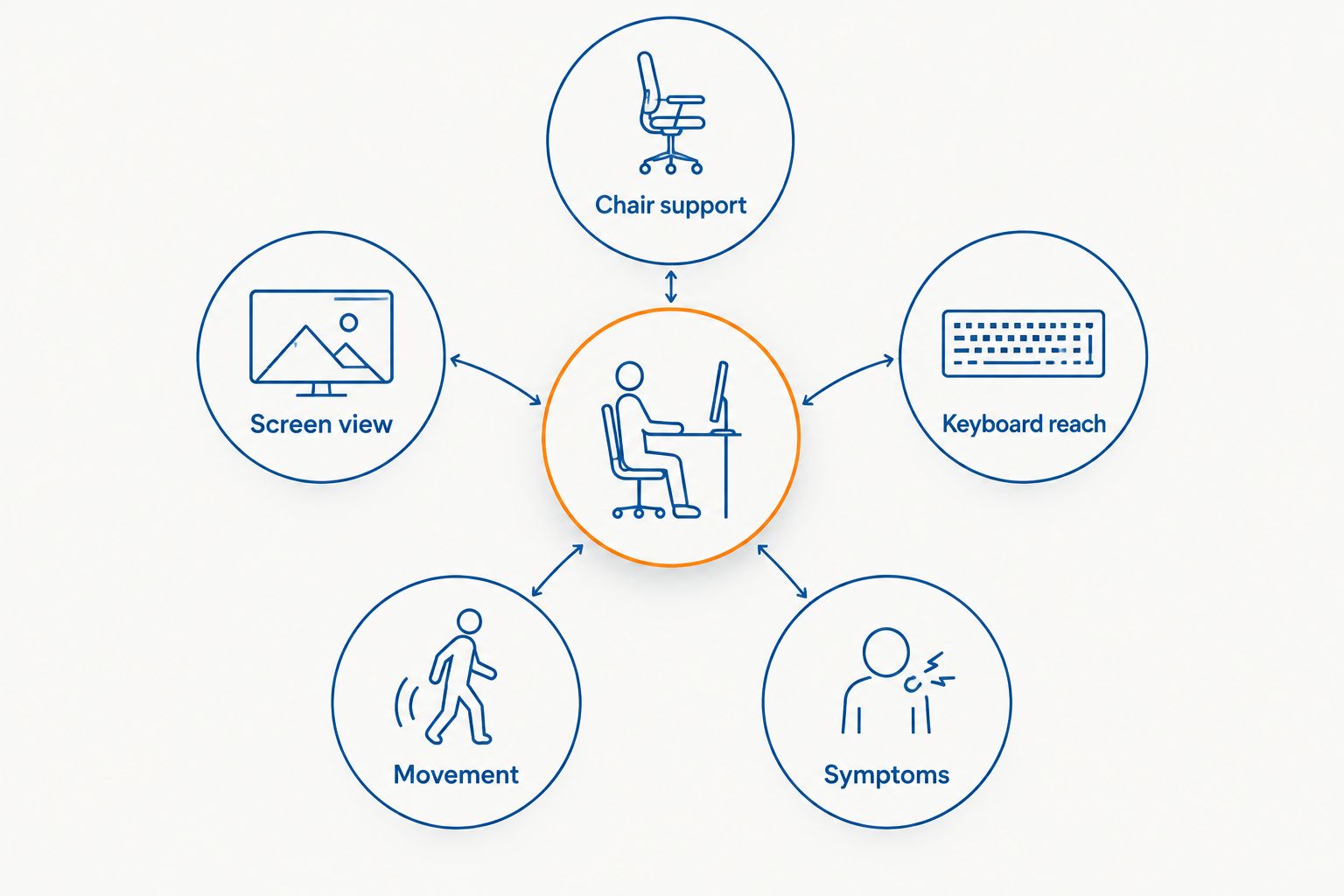
A desk check is more useful than trying to hold a single ideal-looking posture. If you change between a laptop and an external screen, repeat the check in each arrangement. A cushion that fits one chair need not feel right in another; the decision is about the setup you actually use.
How this 2026 ranking works
The order reflects the clarity of each option's job. An adjustable lumbar cushion addresses a defined chair-support gap. A rolled towel helps you check that same gap without committing to a shaped accessory. A wearable shoulder brace offers a cue but leaves the chair and desk unchanged.
This is not a clinical effectiveness ranking. No specific products, comparative trials or claim-specific evidence were provided to support an assertion that one corrector prevents or resolves back or neck pain. Choose by fit and task, not by a claim that a device can fix posture. If you cannot identify what the accessory needs to change, revisit the workstation before choosing one.
When to seek advice instead of another corrector
Persistent or worsening discomfort deserves an individual assessment rather than a series of posture purchases. The choice of health professional depends on your symptoms and circumstances. Mychiro is a chiropractic clinic in Bondi Junction offering chiropractic care and spinal adjustments; whether those services are appropriate can be discussed following assessment.
Seek urgent medical assessment for new weakness, loss of bladder or bowel control, numbness around the groin, or severe symptoms after an injury. A posture corrector is not an appropriate response to those signs. Tell a qualified health professional about symptoms that spread, change or interfere with usual activities, even if you also want advice on your desk setup.
Which posture corrector should you choose?
Choose an adjustable lumbar cushion only when your chair lacks comfortable lower-back support and the cushion fits your working position. Choose a rolled towel first if you need to check whether added support feels useful. Skip a wearable shoulder brace as a default response to desk discomfort: its cue does not change an unsuitable desk arrangement.
For a desk worker in 2026, the useful question is not whether a product promises straighter posture. It is whether the accessory does a specific job without making typing, viewing the screen or changing position harder. Mychiro can discuss posture concerns as part of chiropractic care in Bondi Junction; an accessory choice and a clinical assessment are different decisions.
FAQ
What is the best posture corrector for desk workers in 2026?
An adjustable lumbar cushion is the first option to consider when a chair lacks comfortable lower-back support. Check its fit during normal desk tasks; it does not correct screen or keyboard placement.
Is a lumbar cushion better than a shoulder brace for desk work?
A lumbar cushion addresses support at the chair, while a shoulder brace provides a position cue. Choose according to the gap you have identified rather than treating either as a solution for every posture concern.
Can a rolled towel replace a lumbar cushion?
A rolled towel can help you check whether added lower-back support feels comfortable in your chair. Its shape can change during use, so reassess its position while you work.
Will a posture corrector fix neck or back pain?
A posture corrector does not identify the cause of neck or back pain. Discuss persistent, worsening or changing symptoms with a qualified health professional.
Should I wear a shoulder reminder brace all day at my desk?
Do not use a brace to hold yourself in one position throughout the day. Check whether it restricts movement or makes work uncomfortable, and review the workstation itself.
What should I check before buying a posture corrector?
Check chair support, screen view, keyboard reach and whether you can change position. Then identify the specific job an accessory would do in your setup.
When should desk-related symptoms be assessed urgently?
Seek urgent medical assessment for new weakness, loss of bladder or bowel control, numbness around the groin, or severe symptoms after an injury. Do not rely on a posture accessory for these signs.
One last thing
The accessory that feels supportive for a short sit must also fit the tasks you perform at your desk. In 2026, test that distinction while you type, read and change position. If support creates a new reach or pressure problem, changing the setup is a more relevant next step than trying to sit more rigidly. Mychiro offers chiropractic care in Bondi Junction for people who want to discuss posture concerns; suitability for any service depends on individual assessment.
Related guides
- Standing desk converters and workstation choices
- Lumbar support cushions for office chairs
- Lower back pain when sitting
- Neck pain on waking: common contributors