

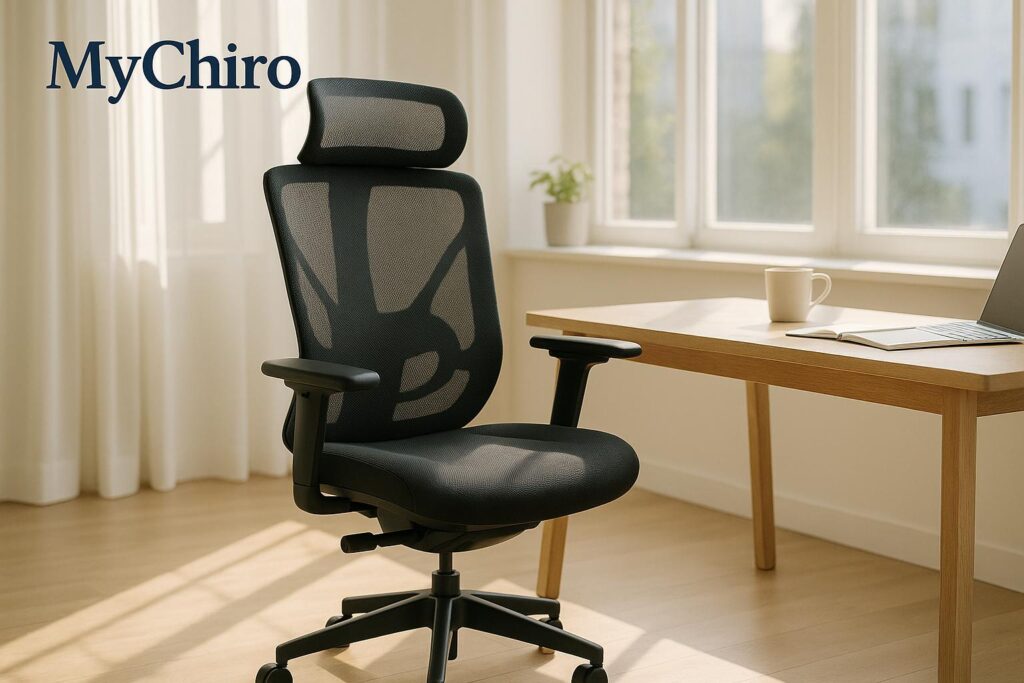
When it comes to choosing an ergonomic chair, chiropractors stress the importance of proper spinal support, adjustability, and encouraging natural movement. Poor seating can lead to back pain, neck tension, and headaches, but the right chair can help maintain posture and reduce discomfort. Here are three chiropractor-recommended options:
- Herman Miller Mirra 2 Butterfly ($1,800–$2,400 AUD): Premium design with adjustable lumbar support, dynamic tilt, and breathable mesh. Ideal for professionals seeking advanced features.
- CoreChair ($800–$1,200 AUD): Focuses on active sitting, engaging core muscles and improving posture. Great for those wanting movement-friendly seating.
- Flexispot BS3 ($400–$600 AUD): Budget-friendly with adjustable lumbar support, armrests, and a mesh backrest. Suitable for general office use.
Key Takeaway: Even the best chair needs proper setup and regular movement breaks to support long-term spinal health. Chiropractors recommend adjusting seat height, lumbar support, and armrests to fit your body. Pair your ergonomic chair with posture-friendly habits and consult a professional for personalised advice if needed.
Choosing the best Office Chair @ Chairlines // Langley BC Chiropractor

What Chiropractors Look for in Ergonomic Chairs
Chiropractors assess ergonomic chairs for features that promote musculoskeletal health and minimise the strain caused by extended sitting. Knowing what to look for in a chair can guide you towards one that supports your spine and overall posture. Let’s explore the key elements chiropractors prioritise.
Adjustable Lumbar Support
A poorly designed chair can flatten the natural curve of your lower back, leading to discomfort and strain. Chiropractors often highlight adjustable lumbar support as a critical feature for maintaining this curve and reducing lower back stress.
The ideal lumbar support aligns with the belt line, roughly at the level of the third to fifth lumbar vertebrae. Since everyone’s body is different, the support should be adjustable in both height and depth. Some individuals may need stronger reinforcement, while others may prefer a gentler level of support.
High-quality chairs allow you to fine-tune the lumbar support throughout the day, which is essential as your posture and muscle needs can shift during long periods of sitting. This adaptability ensures consistent support as fatigue sets in.
Active Sitting Technology
Sitting still for long periods can lead to muscle stiffness and poor circulation. Chiropractors often recommend chairs with active sitting technology, which encourages subtle movements and keeps your core engaged.
Features like controlled tilt mechanisms allow the seat and backrest to move either together or independently, promoting better blood flow and reducing muscle tension from static positions. Some chairs even have dynamic seat surfaces that respond to your body’s micro-movements, encouraging small posture adjustments to combat stiffness.
Chairs with smooth swivel functions and controlled tilting mechanisms can also help reduce spinal twisting and activate core muscles. Chiropractors generally agree that chairs promoting gentle, controlled movement are better for your body than rigid seating. However, it’s important that these movements are supported by proper spinal alignment.
Seat and Backrest Adjustability
A chair that doesn’t fit your body can lead to discomfort and poor posture, which is why chiropractors stress the importance of comprehensive adjustability. People come in all shapes and sizes, and a chair that’s perfect for one person may not work for another.
Seat height and depth adjustments are crucial. Your feet should rest flat on the floor, and your thighs should be fully supported without putting pressure behind your knees. Most ergonomic chairs offer pneumatic height adjustments that accommodate users between 155cm and 195cm tall.
Backrest adjustability is equally important. The angle should allow for a slight recline – around 100-110 degrees – to reduce pressure on your spine while keeping you alert. The backrest height should align with your spine’s natural curves, providing support to both the lumbar and thoracic regions.
Additionally, armrest adjustability is a key factor. Armrests should move in multiple directions – height, width, depth, and angle – to reduce strain on your shoulders and neck. Proper armrest support helps keep your shoulders relaxed and can prevent the forward head posture that often develops during desk work.
When all these adjustments come together, they provide a customised seating experience that promotes good posture and spinal alignment, helping you stay comfortable and supported throughout the day.
Chiropractor-Recommended Ergonomic Chairs
If you’re looking for seating options that prioritise spinal health, here are three chiropractor-endorsed ergonomic chairs worth considering. These chairs are designed with features like adjustable lumbar support, movement-friendly mechanisms, and versatile adjustability to tackle the common aches and pains linked to long hours of sitting.
Herman Miller Mirra 2 Butterfly

With a price range of $1,800 to $2,400 AUD, the Herman Miller Mirra 2 stands out for its advanced ergonomic design. Its butterfly back support system, made from flexible polymer, adapts to the natural curves of your spine, while the adjustable lumbar support ensures a personalised fit. The breathable mesh material helps keep you cool during long workdays, and the PostureFit SL technology offers targeted support for the pelvis and lower back, encouraging your spine’s natural S-curve.
One of its highlights is the dynamic tilt mechanism, which allows independent movement of the seat and backrest. This promotes natural motion, helping to reduce stiffness. The chair is built to accommodate users between 150cm and 195cm tall, with a weight limit of 136kg. Its armrests adjust in four directions – height, width, depth, and pivot – providing tailored support that can help alleviate neck and shoulder tension. Chiropractors often recommend this chair for its ability to encourage active sitting while maintaining proper spinal alignment.
CoreChair

The CoreChair, priced between $800 and $1,200 AUD, takes a unique approach with its active sitting technology. Its sculpted seat design encourages subtle core engagement, promoting pelvic stability and helping strengthen postural muscles over time. Unlike traditional chairs that encourage passive sitting, this one requires gentle core activation, making it an excellent choice for those looking to improve their posture.
The chair’s 360-degree mobility allows for natural movement throughout the day, which can enhance circulation and reduce stiffness from prolonged sitting. It also features adjustable lumbar support to match your spine’s unique curve. Supporting users up to 136kg and accommodating heights from 155cm to 190cm, this chair fits most body types. With a seat height range of 43cm to 58cm, it works seamlessly with standard desks. Chiropractors often highlight its focus on active sitting as a key benefit for long-term spinal health.
Flexispot BS3

For a more budget-friendly option, the Flexispot BS3 is available for around $400 to $600 AUD. Despite its lower price, it offers many ergonomic features designed for comfort and support. The breathable mesh backrest and adjustable lumbar support are ideal for extended use, while the 4D armrests – adjustable in height, width, depth, and angle – help reduce strain on the shoulders and neck.
The seat depth adjustment ensures proper thigh support for users of varying leg lengths, and the tilt mechanism includes locking positions for customised recline angles. The headrest adjusts vertically and horizontally, providing neck support that’s particularly helpful during phone calls or video meetings. With a weight capacity of 125kg and height accommodation from 160cm to 185cm, the BS3 is a versatile choice for many users. Its smooth-rolling casters and 360-degree swivel also encourage natural movement, which can help minimise spinal strain during daily activities.
Each of these chairs brings its own strengths to the table, catering to different budgets and ergonomic needs. The right choice depends on your specific body dimensions, work habits, and personal comfort preferences – all while keeping long-term musculoskeletal health in mind.
sbb-itb-585d67d
Chair Comparison: Pros and Cons
When it comes to selecting the right chair for your workspace, understanding the strengths and limitations of each option is crucial. Here’s a detailed breakdown to help you weigh your choices.
Comparison Table
| Chair | Price Range (AUD) | Key Features | Pros | Cons | Best For |
|---|---|---|---|---|---|
| Herman Miller Mirra 2 | $1,800 – $2,400 | Butterfly back support, PostureFit SL, dynamic tilt, breathable mesh | High-quality build; fully adjustable; excellent support for natural movement and lumbar | Expensive; adjustment system can be tricky for some users | Professionals with a higher budget who need premium ergonomic features |
| CoreChair | $800 – $1,200 | Active sitting technology, sculpted seat, 360° mobility, core engagement | Encourages movement and core activation; balances support with dynamic sitting | May take time to adapt; less traditional stability might feel unusual at first | Those seeking a dynamic seating solution to improve posture and core strength |
| Flexispot BS3 | $400 – $600 | 4D armrests, adjustable lumbar support, seat depth adjustment, mesh backrest | Affordable; offers basic ergonomic adjustments for comfortable posture | Limited weight capacity (125kg); fewer high-end materials; restricted height adjustment | Budget-conscious users who need a functional ergonomic chair for standard work requirements |
Chair Highlights
Herman Miller Mirra 2: If you’re after a chair that combines advanced materials with ergonomic precision, this one’s a strong contender. Its butterfly back and PostureFit SL technology provide targeted lumbar support, making it a great option for long hours at the desk. However, its premium price and complex adjustment system may not suit everyone.
CoreChair: Designed to promote active sitting, this chair encourages movement and engages your core muscles. Its sculpted seat and 360-degree mobility make it a standout choice for those looking to boost posture and core strength. Keep in mind, it might take some time to get used to its less conventional design.
Flexispot BS3: For those on a tighter budget, the Flexispot BS3 delivers essential ergonomic features like adjustable armrests and lumbar support. While it doesn’t have the premium materials or advanced adjustments of pricier models, it’s a solid choice for maintaining good posture during typical workdays.
Final Thoughts
Choosing the right chair depends on your seating habits, budget, and ergonomic needs. Whether you’re investing in the advanced features of the Herman Miller Mirra 2, opting for the dynamic design of the CoreChair, or sticking to the budget-friendly Flexispot BS3, remember that even the best chair works best when paired with regular movement and a well-organised workspace.
How to Set Up Your Ergonomic Chair
Even the best ergonomic chair needs to be adjusted correctly to truly support your spine. A crucial point to remember is that your desk setup should complement your chair – not the other way around.
Chair Adjustment for Spinal Health
Properly adjusting your chair involves several steps, each designed to support the natural curves of your spine. Here’s how to get started:
Seat Height: The Base of Good Posture
Set your chair height so your feet rest flat on the floor, and your knees are slightly lower than your hips. This alignment is key because sitting with your knees higher than your hips puts extra pressure on your lower back, neck, and shoulders. On the other hand, if your feet dangle, it can reduce circulation and create discomfort by pressing under your thighs. If your feet don’t touch the floor even after adjusting the seat height, use a footrest instead of lowering the chair too much.
Seat Depth: Finding the Right Support
Adjust the seat depth so there’s a small gap – about 2–3 fingers wide (roughly 5 cm) – between the seat’s edge and the back of your knees. This ensures your thighs are properly supported without putting pressure on the backs of your knees.
Once this is set, move on to your armrest positioning to ease any upper body strain.
Armrest Positioning: Reducing Upper Body Strain
Your armrests should allow your forearms to rest comfortably, parallel to the ground, with your elbows bent at about 90 degrees and your shoulders relaxed. If the armrests are too high or too low, they can cause unnecessary tension in your shoulders. If they prevent you from sitting close enough to your desk, consider adjusting them or removing them altogether. Revisit and tweak these settings as your tasks or posture change throughout the day.
Consider Professional Guidance
As mentioned earlier, chiropractors or ergonomic specialists can provide personalised advice to fine-tune your chair setup. They’re trained to assess individual needs and can help address specific postural concerns that generic guides might miss. Since everyone’s body is different, a professional assessment can make a big difference in achieving a comfortable and supportive setup.
Movement and Posture Breaks
Even with a perfectly adjusted chair, staying in one position for too long isn’t ideal. Movement is essential to maintaining spinal health.
The 30-30-30 Rule
Every 30 minutes, take a 30-second break to stand up and focus on something about 10 metres away. This habit helps reset your posture, boost circulation, and reduce eye strain from prolonged screen use.
Incorporate Small Movements
Throughout the day, add micro-movements while seated. Try shoulder rolls, gentle neck stretches, or shifting your weight from side to side. Active sitting chairs, like the CoreChair, can also encourage subtle, natural movements to keep your body engaged.
Stretching and Standing Breaks
When you stand, make the most of it by incorporating stretches. Reach your arms overhead, do a gentle backbend, or take a quick walk to loosen up. Focus on movements that counter the slouched or forward-leaning posture that often comes with desk work.
Mix Up Your Workspace
If possible, alternate between sitting and standing during the day. Switching to a different chair or using another work surface for even a short time can introduce much-needed variety to your posture.
Conclusion
Selecting the right ergonomic chair can play a key role in maintaining spinal health and easing discomfort caused by sitting for long periods. Chairs like the Herman Miller Mirra 2 Butterfly, CoreChair, and Flexispot BS3 are often highlighted by chiropractors for their thoughtful designs that encourage proper posture and healthy movement throughout the day.
That said, an ergonomic chair is just one piece of the puzzle. Even the best chair won’t work wonders if it’s not adjusted to suit your body or if you remain seated for hours without breaks. Incorporating regular movement and staying mindful of your posture are just as crucial for long-term spinal health.
Because everyone’s body, posture, and work habits are different, the "perfect" chair and setup can vary. If you’re still experiencing discomfort despite using an ergonomic chair, it may be time to consult a chiropractor. They can provide personalised advice tailored to your specific needs. For those near Bondi Junction, Dr Steve offers professional chiropractic care focused on posture and spinal health, with expertise in addressing desk-related issues.
Ultimately, a well-chosen ergonomic chair, when paired with proper adjustments, regular movement, and expert guidance, can help improve your comfort, productivity, and overall spinal health.
This information is general and not a replacement for professional medical advice. Chiropractic care is focused on musculoskeletal health, and results may differ for each individual. Always consult a qualified healthcare professional before making decisions about your health.
FAQs
What should I look for in an ergonomic chair to support spinal health?
When selecting an ergonomic chair to support your spine, prioritise one with adjustable lumbar support. This feature allows you to tailor the chair to the natural curve of your lower back, which is key for alignment and comfort. Look for options that let you adjust both the height and depth of the lumbar support.
A contoured backrest is another important feature. By aligning with the natural curve of your spine, it can help improve posture and minimise strain. Don’t overlook the importance of adjustable seat height and tilt functionality either. These adjustments ensure you can sit comfortably with your feet flat on the floor and your knees bent at a 90-degree angle. Together, these features can help counteract the effects of sitting for long periods and contribute to better spinal health over time.
What are the benefits of active sitting technology in ergonomic chairs like the CoreChair for posture and spinal health?
Active sitting technology, like what’s found in the CoreChair, is designed to encourage gentle, continuous movement while you’re seated. This subtle activity helps engage your core muscles, supporting the natural S-curve of your spine and alleviating some of the strain that comes with sitting still for extended periods.
Beyond posture, this dynamic sitting style can boost blood flow and neuromuscular activity, which might lead to better postural stability over time. If you’re someone who spends hours at a desk, this could be a helpful way to minimise discomfort and promote healthier spinal support in the long run.
Why should you adjust your ergonomic chair and take regular movement breaks during the day?
Making regular adjustments to your ergonomic chair is key to maintaining proper posture and reducing discomfort. By tailoring the chair to fit your body, you can minimise strain on your back, neck, and shoulders – especially during those long periods of sitting.
Equally important is taking frequent breaks to move around. A quick stretch, a short walk, or simply shifting positions can do wonders for your circulation, ease stiffness, and lower the chances of developing musculoskeletal problems. These small but impactful habits can significantly improve your spinal health and overall comfort, contributing to a better sense of wellbeing throughout your day.